%22%2F%3E%3Cpath%20d%3D%22M80%2019.0476C80%2021.8529%2077.4958%2024%2074.4487%2024H38.1027C37.5097%2024%2036.9205%2024.088%2036.358%2024.2607L35.6865%2024.4667C34.039%2024.9723%2033.0561%2026.2588%2032.507%2027.7756L32.2831%2028.3938C32.0956%2028.9117%2032%2029.4541%2032%2030V43.144C32%2045.9492%2029.322%2048%2026.275%2048H5.58529C2.53821%2048%200%2045.9799%200%2043.1746V29.2064C0%2026.4011%202.5131%2023.9667%205.56018%2023.9667H25.3545C25.9475%2023.9667%2026.5366%2023.8787%2027.0992%2023.7061L27.7707%2023.5C29.4182%2022.9944%2030.9439%2021.9645%2031.493%2020.4478L31.7169%2019.8296C31.9044%2019.3117%2032%2018.7693%2032%2018.2234V5.07937C32%202.27411%2034.1943%200%2037.2414%200H74.4828C77.5298%200%2080%202.27411%2080%205.07937V19.0476Z%22%20fill%3D%22url(%23b)%22%2F%3E%3Cdefs%3E%3ClinearGradient%20id%3D%22a%22%20x1%3D%220%22%20y1%3D%2280%22%20x2%3D%2280%22%20y2%3D%220%22%20gradientUnits%3D%22userSpaceOnUse%22%3E%3Cstop%20stop-color%3D%22%236B7280%22%2F%3E%3Cstop%20offset%3D%22.9%22%20stop-color%3D%22%239CA3AF%22%2F%3E%3C%2FlinearGradient%3E%3ClinearGradient%20id%3D%22b%22%20x1%3D%220%22%20y1%3D%2280%22%20x2%3D%2280%22%20y2%3D%220%22%20gradientUnits%3D%22userSpaceOnUse%22%3E%3Cstop%20stop-color%3D%22%236B7280%22%2F%3E%3Cstop%20offset%3D%22.9%22%20stop-color%3D%22%239CA3AF%22%2F%3E%3C%2FlinearGradient%3E%3C%2Fdefs%3E%3C%2Fsvg%3E)
%22%2F%3E%3Cpath%20d%3D%22M80%2019.0476C80%2021.8529%2077.4958%2024%2074.4487%2024H38.1027C37.5097%2024%2036.9205%2024.088%2036.358%2024.2607L35.6865%2024.4667C34.039%2024.9723%2033.0561%2026.2588%2032.507%2027.7756L32.2831%2028.3938C32.0956%2028.9117%2032%2029.4541%2032%2030V43.144C32%2045.9492%2029.322%2048%2026.275%2048H5.58529C2.53821%2048%200%2045.9799%200%2043.1746V29.2064C0%2026.4011%202.5131%2023.9667%205.56018%2023.9667H25.3545C25.9475%2023.9667%2026.5366%2023.8787%2027.0992%2023.7061L27.7707%2023.5C29.4182%2022.9944%2030.9439%2021.9645%2031.493%2020.4478L31.7169%2019.8296C31.9044%2019.3117%2032%2018.7693%2032%2018.2234V5.07937C32%202.27411%2034.1943%200%2037.2414%200H74.4828C77.5298%200%2080%202.27411%2080%205.07937V19.0476Z%22%20fill%3D%22url(%23b)%22%2F%3E%3Cdefs%3E%3ClinearGradient%20id%3D%22a%22%20x1%3D%220%22%20y1%3D%2280%22%20x2%3D%2280%22%20y2%3D%220%22%20gradientUnits%3D%22userSpaceOnUse%22%3E%3Cstop%20stop-color%3D%22%230061FF%22%2F%3E%3Cstop%20offset%3D%22.9%22%20stop-color%3D%22%2360EFFF%22%2F%3E%3C%2FlinearGradient%3E%3ClinearGradient%20id%3D%22b%22%20x1%3D%220%22%20y1%3D%2280%22%20x2%3D%2280%22%20y2%3D%220%22%20gradientUnits%3D%22userSpaceOnUse%22%3E%3Cstop%20stop-color%3D%22%230061FF%22%2F%3E%3Cstop%20offset%3D%22.9%22%20stop-color%3D%22%2360EFFF%22%2F%3E%3C%2FlinearGradient%3E%3C%2Fdefs%3E%3C%2Fsvg%3E)
Classification
Confirm what happened and who was responsible, for selected events or for one event, and review agent proposals.
A classification records a category for what happened and a responsibility party for who was responsible. Only confirmed classifications appear in Category / Responsibility, match the list's category and responsibility filters and decide how an event counts in a contract's availability. The agent proposes, a person approves.
Proposed and confirmed
A classification is either an agent's proposal or a person's confirmation.
- An agent proposal changes nothing. It does not classify the event, does not leave the unclassified count and does not count in availability. It waits on the event record until a person answers it.
- A confirmed classification counts. A person chose it, by confirming a proposal as it stands, by changing it, or by classifying without one.
Every classification is a numbered version. A new decision adds a version and never edits an earlier one, so the history shows every proposal and every confirmation in order.
Confirm selected events
- Open Insight → Monitor → Events and narrow the list to the events you need.
- Select individual event checkboxes, or Select all events on this page. Selection belongs to the current page and filters. A filter or page change clears it.
- Choose Classify selected.
- Choose Confirmed category and Confirmed responsibility from the installed vocabulary. Add a Note (optional) if it helps explain the decision.
- Read the confirmation, then choose Confirm classification. Cancel closes it without saving.
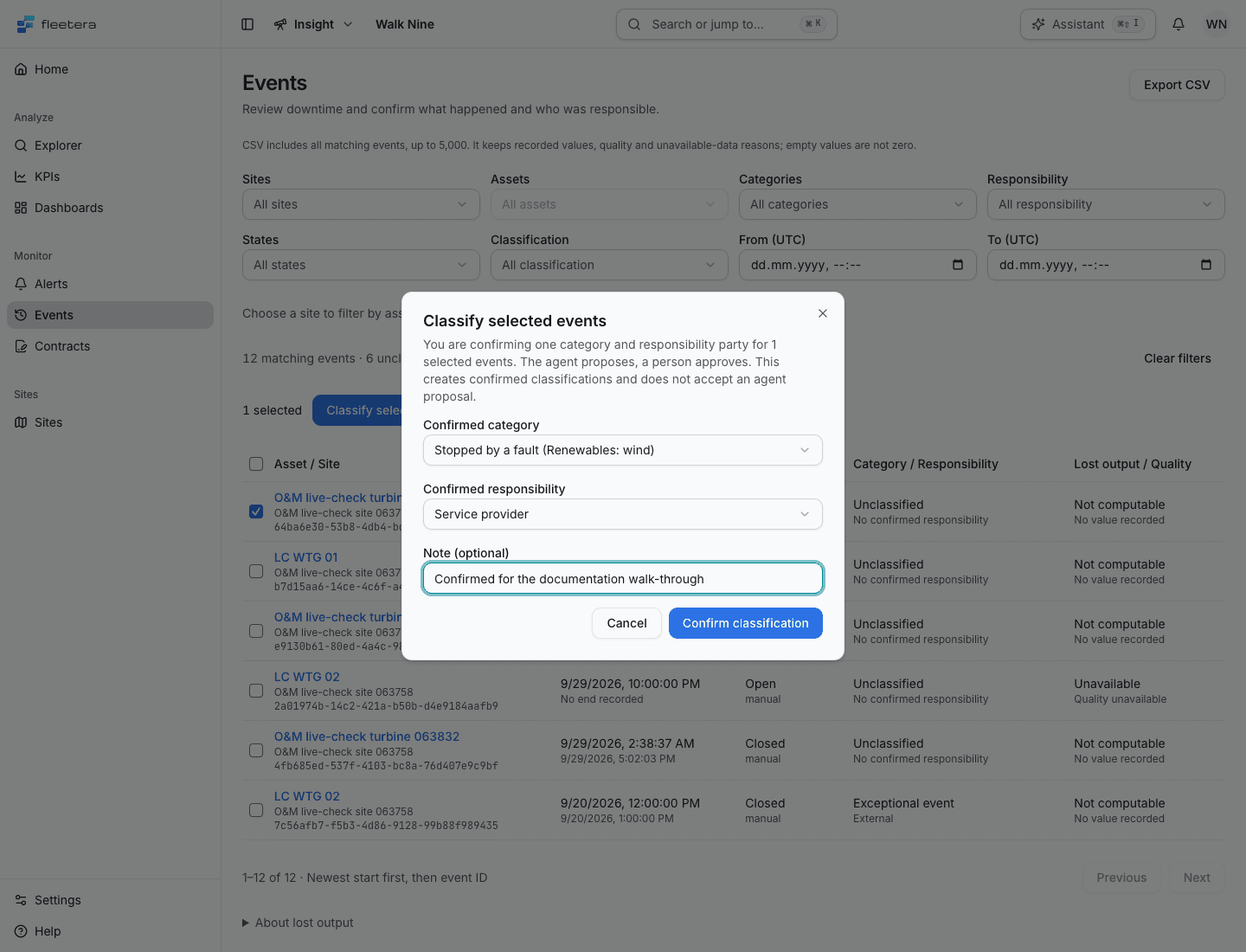
The confirmation applies the same category and party to the selected events, up to 100 in one request. It creates confirmed classifications. It does not accept an individual agent proposal; review those on the event record.
Read the results
The page lists a result for every submitted event, including its event ID, below a count such as 1 classified · 0 refused. Successful events become Classified and leave the selection. Refused events stay selected for correction, each with its reason. The matching and unclassified counts refresh after the request.
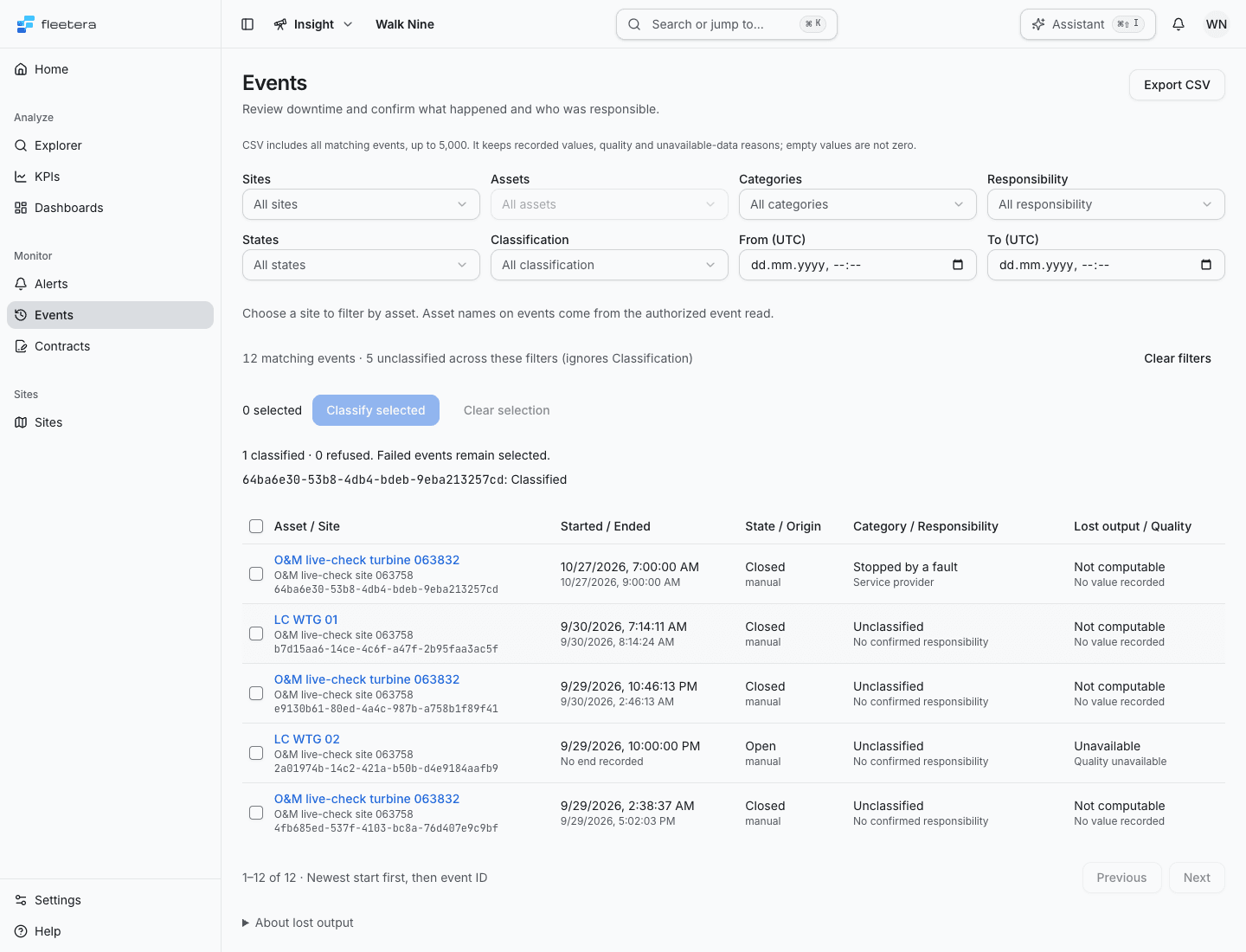
A conflict means the event or classification changed, or the selected category or responsibility is no longer usable. Read the reason and refresh before trying again. A refused event that has since left the list is named as no longer listed and is not kept selected.
If one event's result says the database was busy or failed, the page adds The saved outcome may be unknown. Reload Events and check before making a new decision.
Classification outcome unknown means some changes may have saved or may still be processing. Classification stays paused to prevent a repeat, even if the list refreshes or you change filters. Choose Reload Events, review the current classifications, then make a new selection and decision. Reloading does not prove that the earlier request has finished. Do not repeat the earlier choice without checking what is now recorded.
If the page cannot verify the whole response, it closes the confirmation and clears the submitted selection and draft. If it has verified results for individual events, those results remain visible and only refused events remain selected.
If the vocabulary cannot be read, classification and the category and responsibility filters are unavailable. If you lack write permission, the selection and classification controls are absent.
Classify one event
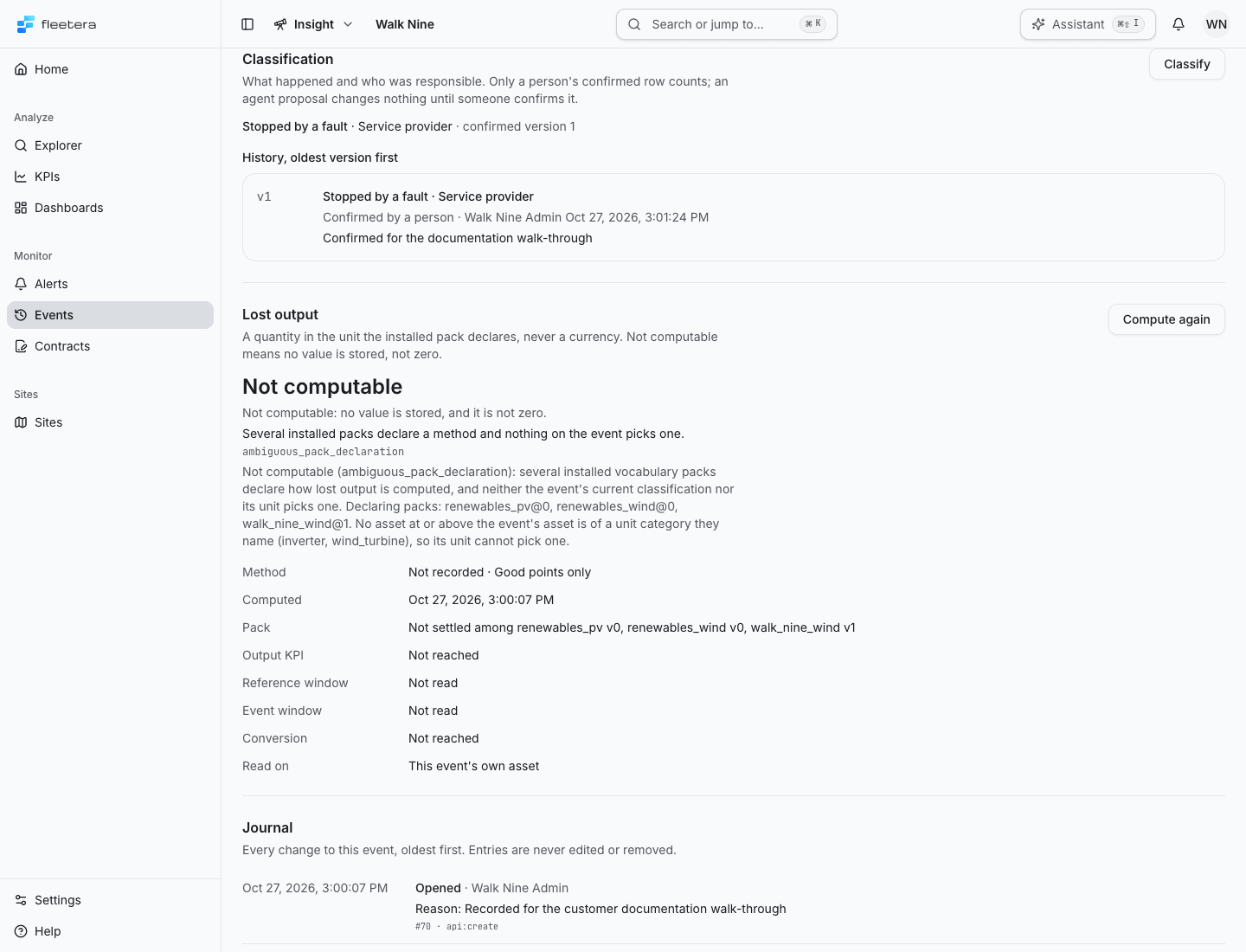
On the event record, Classification shows the confirmed classification, for example Stopped by a fault · Service provider · confirmed version 1, or No confirmed classification.
- Choose Classify.
- Choose Confirmed category and Confirmed responsibility.
- Enter a Reason (required). It is kept with the version.
- Choose Confirm classification.
The dialog writes a new confirmed version. Earlier versions stay in the history.
Review an agent proposal
Each unanswered proposal shows as Agent proposes with its category, party and version.
- Choose Review proposal. The dialog, Review agent proposal, starts from the proposed category and party.
- Keep them, or change either one.
- Enter a Reason (required) and choose Confirm classification.
Nothing is applied until you confirm. Confirming writes a new confirmed version that answers the proposal, as proposed or changed, and the record says which. A proposal is answered once. If someone answered it first, the dialog says so and the record refreshes.
Read the history
History, oldest version first lists every version with its category, party and who acted. Each row says what kind of version it is:
| Row | Meaning |
|---|---|
| Agent proposal, unconfirmed | An agent proposed it and nobody has answered |
| Agent proposal, answered in version 3 | An agent proposed it and a person answered it in the version named |
| Confirmed by a person | A person classified the event without a proposal |
| Confirmed agent proposal version 2 | A person confirmed that proposal as it stood |
| Changed agent proposal version 2 | A person answered that proposal with a different category or party |
A note or reason shows under its row. An agent proposal may carry Evidence, which expands to show what the agent based it on.
While a classification of this event is still being confirmed, or its outcome is unknown, classifying it again is paused on the record and in the list alike. Classification outcome unknown on the record offers Reload; check the history before you decide again.