%22%2F%3E%3Cpath%20d%3D%22M80%2019.0476C80%2021.8529%2077.4958%2024%2074.4487%2024H38.1027C37.5097%2024%2036.9205%2024.088%2036.358%2024.2607L35.6865%2024.4667C34.039%2024.9723%2033.0561%2026.2588%2032.507%2027.7756L32.2831%2028.3938C32.0956%2028.9117%2032%2029.4541%2032%2030V43.144C32%2045.9492%2029.322%2048%2026.275%2048H5.58529C2.53821%2048%200%2045.9799%200%2043.1746V29.2064C0%2026.4011%202.5131%2023.9667%205.56018%2023.9667H25.3545C25.9475%2023.9667%2026.5366%2023.8787%2027.0992%2023.7061L27.7707%2023.5C29.4182%2022.9944%2030.9439%2021.9645%2031.493%2020.4478L31.7169%2019.8296C31.9044%2019.3117%2032%2018.7693%2032%2018.2234V5.07937C32%202.27411%2034.1943%200%2037.2414%200H74.4828C77.5298%200%2080%202.27411%2080%205.07937V19.0476Z%22%20fill%3D%22url(%23b)%22%2F%3E%3Cdefs%3E%3ClinearGradient%20id%3D%22a%22%20x1%3D%220%22%20y1%3D%2280%22%20x2%3D%2280%22%20y2%3D%220%22%20gradientUnits%3D%22userSpaceOnUse%22%3E%3Cstop%20stop-color%3D%22%236B7280%22%2F%3E%3Cstop%20offset%3D%22.9%22%20stop-color%3D%22%239CA3AF%22%2F%3E%3C%2FlinearGradient%3E%3ClinearGradient%20id%3D%22b%22%20x1%3D%220%22%20y1%3D%2280%22%20x2%3D%2280%22%20y2%3D%220%22%20gradientUnits%3D%22userSpaceOnUse%22%3E%3Cstop%20stop-color%3D%22%236B7280%22%2F%3E%3Cstop%20offset%3D%22.9%22%20stop-color%3D%22%239CA3AF%22%2F%3E%3C%2FlinearGradient%3E%3C%2Fdefs%3E%3C%2Fsvg%3E)
%22%2F%3E%3Cpath%20d%3D%22M80%2019.0476C80%2021.8529%2077.4958%2024%2074.4487%2024H38.1027C37.5097%2024%2036.9205%2024.088%2036.358%2024.2607L35.6865%2024.4667C34.039%2024.9723%2033.0561%2026.2588%2032.507%2027.7756L32.2831%2028.3938C32.0956%2028.9117%2032%2029.4541%2032%2030V43.144C32%2045.9492%2029.322%2048%2026.275%2048H5.58529C2.53821%2048%200%2045.9799%200%2043.1746V29.2064C0%2026.4011%202.5131%2023.9667%205.56018%2023.9667H25.3545C25.9475%2023.9667%2026.5366%2023.8787%2027.0992%2023.7061L27.7707%2023.5C29.4182%2022.9944%2030.9439%2021.9645%2031.493%2020.4478L31.7169%2019.8296C31.9044%2019.3117%2032%2018.7693%2032%2018.2234V5.07937C32%202.27411%2034.1943%200%2037.2414%200H74.4828C77.5298%200%2080%202.27411%2080%205.07937V19.0476Z%22%20fill%3D%22url(%23b)%22%2F%3E%3Cdefs%3E%3ClinearGradient%20id%3D%22a%22%20x1%3D%220%22%20y1%3D%2280%22%20x2%3D%2280%22%20y2%3D%220%22%20gradientUnits%3D%22userSpaceOnUse%22%3E%3Cstop%20stop-color%3D%22%230061FF%22%2F%3E%3Cstop%20offset%3D%22.9%22%20stop-color%3D%22%2360EFFF%22%2F%3E%3C%2FlinearGradient%3E%3ClinearGradient%20id%3D%22b%22%20x1%3D%220%22%20y1%3D%2280%22%20x2%3D%2280%22%20y2%3D%220%22%20gradientUnits%3D%22userSpaceOnUse%22%3E%3Cstop%20stop-color%3D%22%230061FF%22%2F%3E%3Cstop%20offset%3D%22.9%22%20stop-color%3D%22%2360EFFF%22%2F%3E%3C%2FlinearGradient%3E%3C%2Fdefs%3E%3C%2Fsvg%3E)
Availability
Read a contract period's time and production availability on the ledger basis, check that its bins reconcile, trace each event and export the rows.
Availability on a contract computes the period's figures from your downtime events, each time you open it. Nothing is stored, so a classification confirmed a minute ago already counts. Every figure states its basis, the designation versions behind it and the inputs it was computed from.
A contract needs a designation before it has availability. Until then the section says This contract has no designation yet, so availability cannot be computed.
Choose a period
- Under Period, choose a month, quarter or year of the contract. The list holds every period that has started, newest first.
- Under Designation version, keep Version in force on each day to bin each day by the version in force on it. Or choose one version to read the whole period under it, for example to see what a backdated correction changed.
The choice stays in the page URL, so a link opens the same period and version. The current period is computed up to now, and the result says Current period, computed to and the time.
The figures
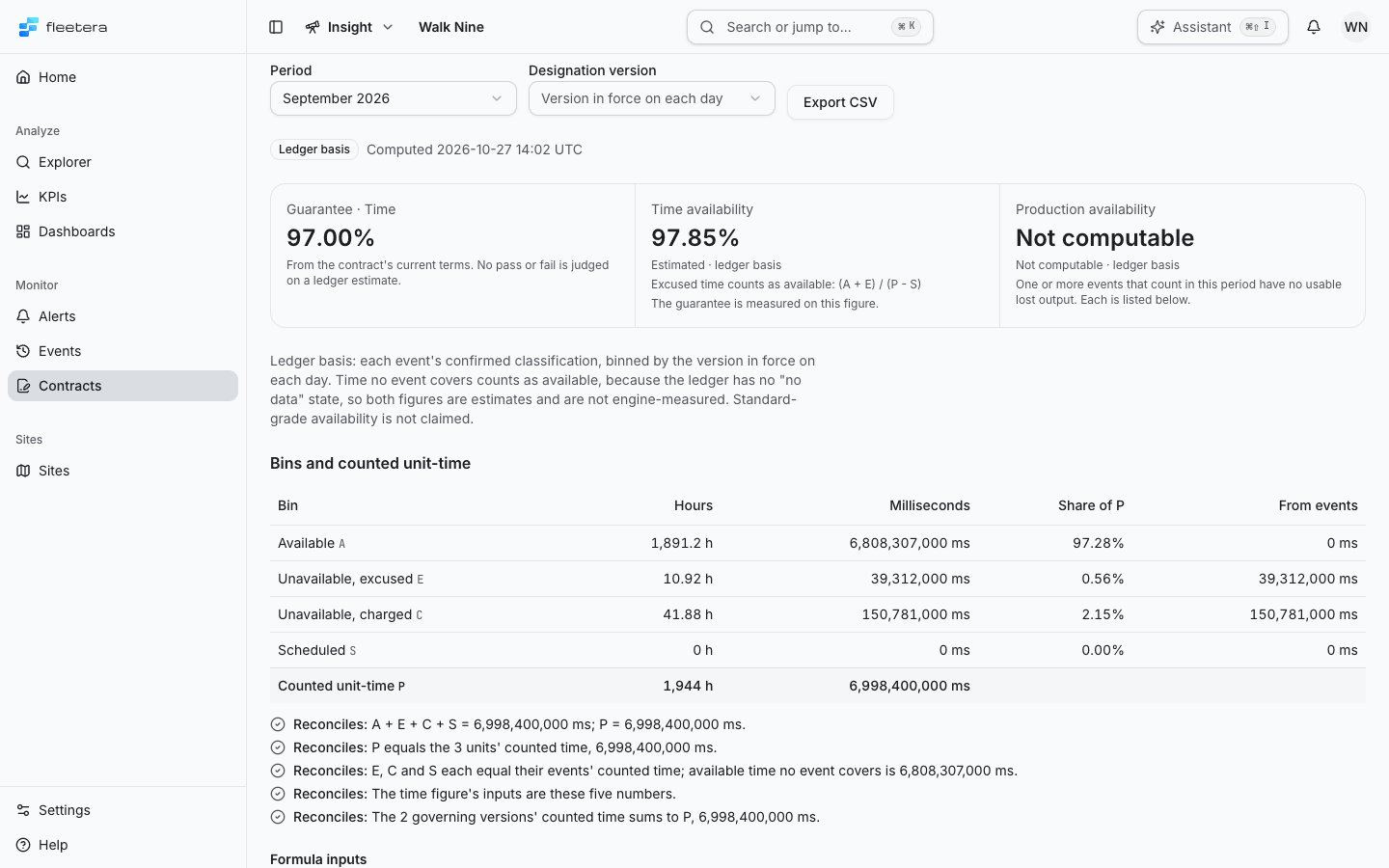
The result is marked Ledger basis and states when it was computed. Three figures follow:
- Guarantee with its kind, from the contract's current terms. No pass or fail is judged on a ledger estimate.
- Time availability, under the version's time formula, for example Excused time counts as available
(A + E) / (P - S). - Production availability, under the version's production formula, in the pack's unit.
The figure the guarantee is measured on says The guarantee is measured on this figure.
Below them, the basis line says how the figures were made: each event's confirmed classification, binned by the designation version named, or binned by the version in force on each day when several versions govern the period. Time no event covers counts as available, because the ledger has no "no data" state, so both figures are estimates and are not engine-measured. Standard-grade availability is not claimed.
Time availability
Time availability reads only the bins. It is Not computable, never zero, when its denominator is zero: when every counted second is scheduled, or, with Excused time is left out, when no time is left outside scheduled and excused time.
Production availability
Production availability needs a usable lost output for every event that counts in the period, and an output reading for every counted unit. It is Not computable, never zero, when for example:
- an event that counts is still open or unwatched, has no lost output yet, or has a stale figure because it was trimmed, split or merged since its lost output was computed;
- an event's lost output is not computable, or in another unit than the pack's;
- a counted unit has no output reading, or no good-quality reading, in its window;
- the output KPI is not defined, states no unit, or its unit cannot be converted;
- produced output over the counted windows is zero or less.
The figure names its reason, and Not computable further down lists each event and unit that blocks it. Fix the event, for example compute its lost output again or close it, then reopen the period.
When the formula changes inside a period
When the versions that govern a period use different time formulas, one figure cannot honestly be stated. Time availability then reads Not computable: the contract's time formula changed inside this period, so one figure cannot be stated. Each version's own figure: and lists each version's range, figure and formula. Production availability does the same when the production formula changes.
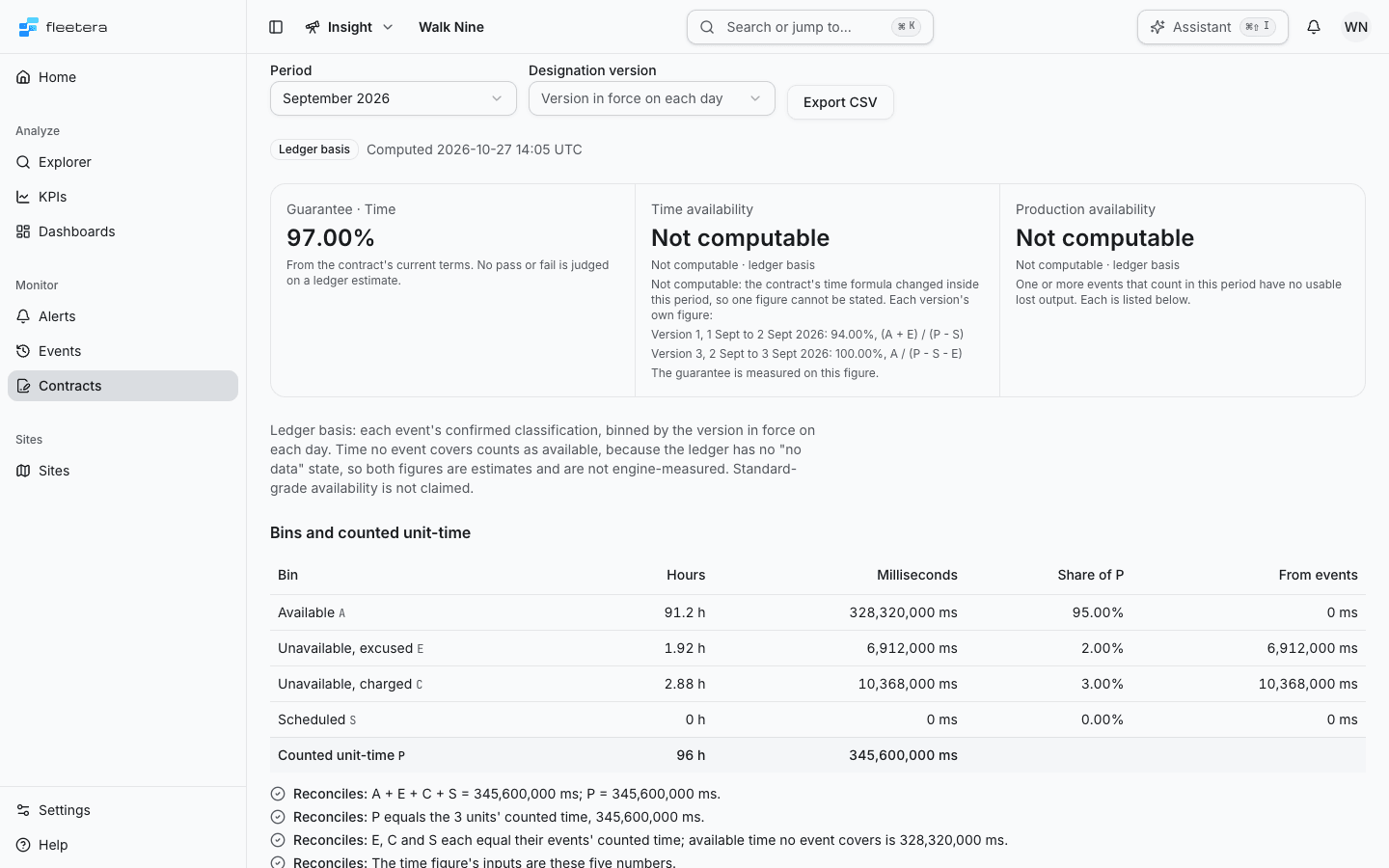
To read one figure for the whole period, choose a single Designation version.
Check that the bins reconcile
Bins and counted unit-time lists each bin, A, E, C and S, in Hours, Milliseconds, Share of P and From events, with Counted unit-time P below. P is each counted unit's time in the period, summed.
The checks below the table recompute the figure's inputs from the drill-down. Each line reads Reconciles or Does not reconcile:
- A + E + C + S equals P.
- P equals the counted units' time.
- E, C and S each equal the counted time of their events, and the available time no event covers is stated.
- The time figure's inputs are these same numbers.
- When several versions govern the period, their counted time sums to P.
Formula inputs writes the formula out with the period's own hours, for example = (1,891.2 + 10.92) / (1,944 − 0) hours, and lists the production inputs: Produced, Lost output, Charged lost output, Excused lost output and Potential, in the pack's unit, or Not available.
Provenance
Provenance lists what the figures rest on:
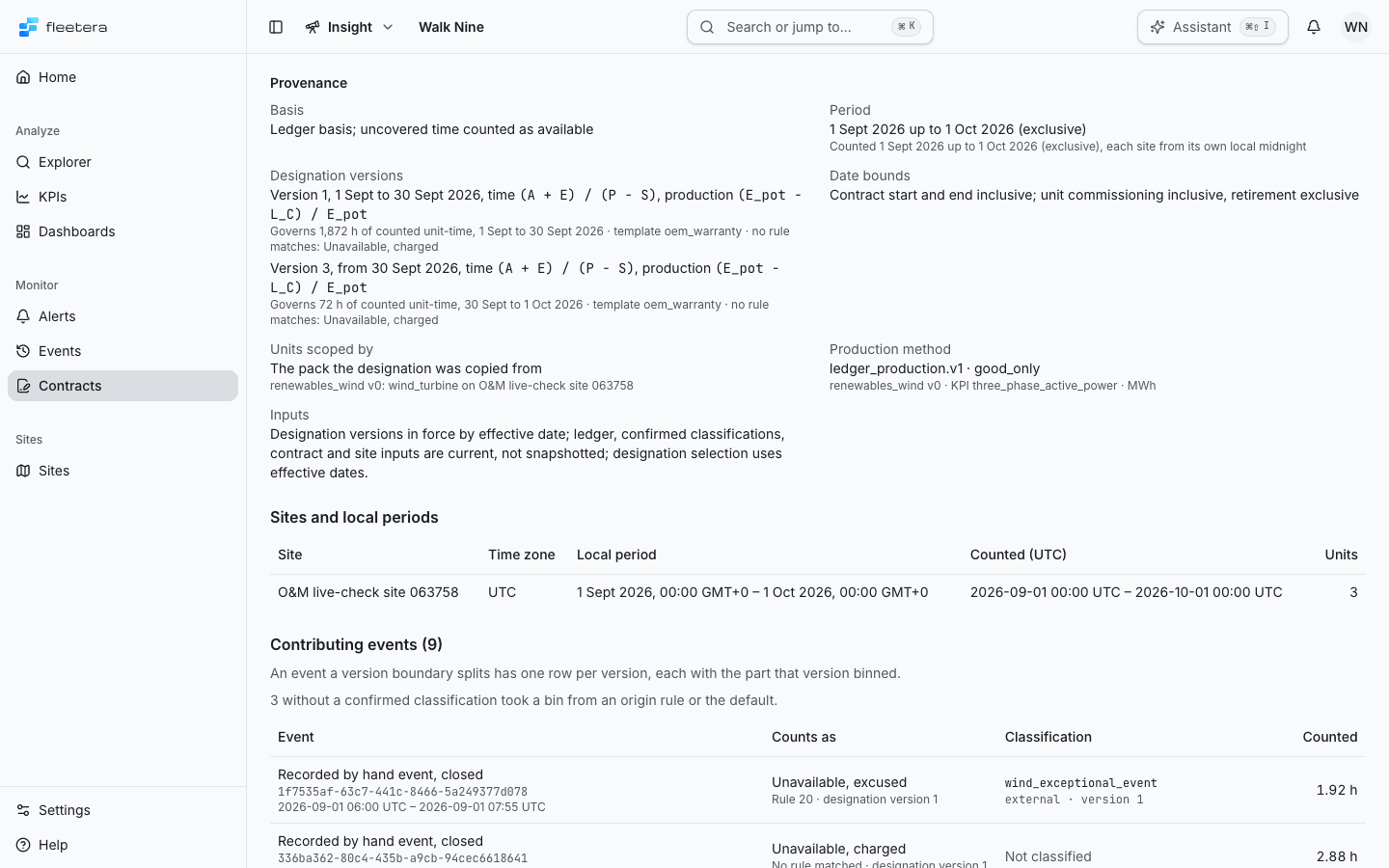
| Fact | What it shows |
|---|---|
| Basis | Ledger basis, and that uncovered time is counted as available |
| Period | The period's dates, and the dates counted, each site from its own local midnight |
| Designation, or Designation versions | Each version that governed part of the period, with its dates, both formulas, how much counted unit-time it governs, its template or explicit rules, and its bin for events no rule matches |
| Date bounds | The contract's start and end count in full; a unit counts from its commissioning date and stops at its retirement date |
| Units scoped by | Which pack decides what a counted unit is, and on which sites |
| Production method | The method and pack the production figure used, its output KPI and unit |
| Inputs | Which inputs are read as they are now: the ledger, confirmed classifications, the contract and the sites |
Sites and local periods shows each covered site's time zone, its local period and the span counted in UTC, and how many units it counts. A site that no longer exists is marked and counts nothing.
Trace the events
Contributing events lists every event that counts in the period. Each event links to its event record, so you can follow a figure back to the event, its classification and its journal.
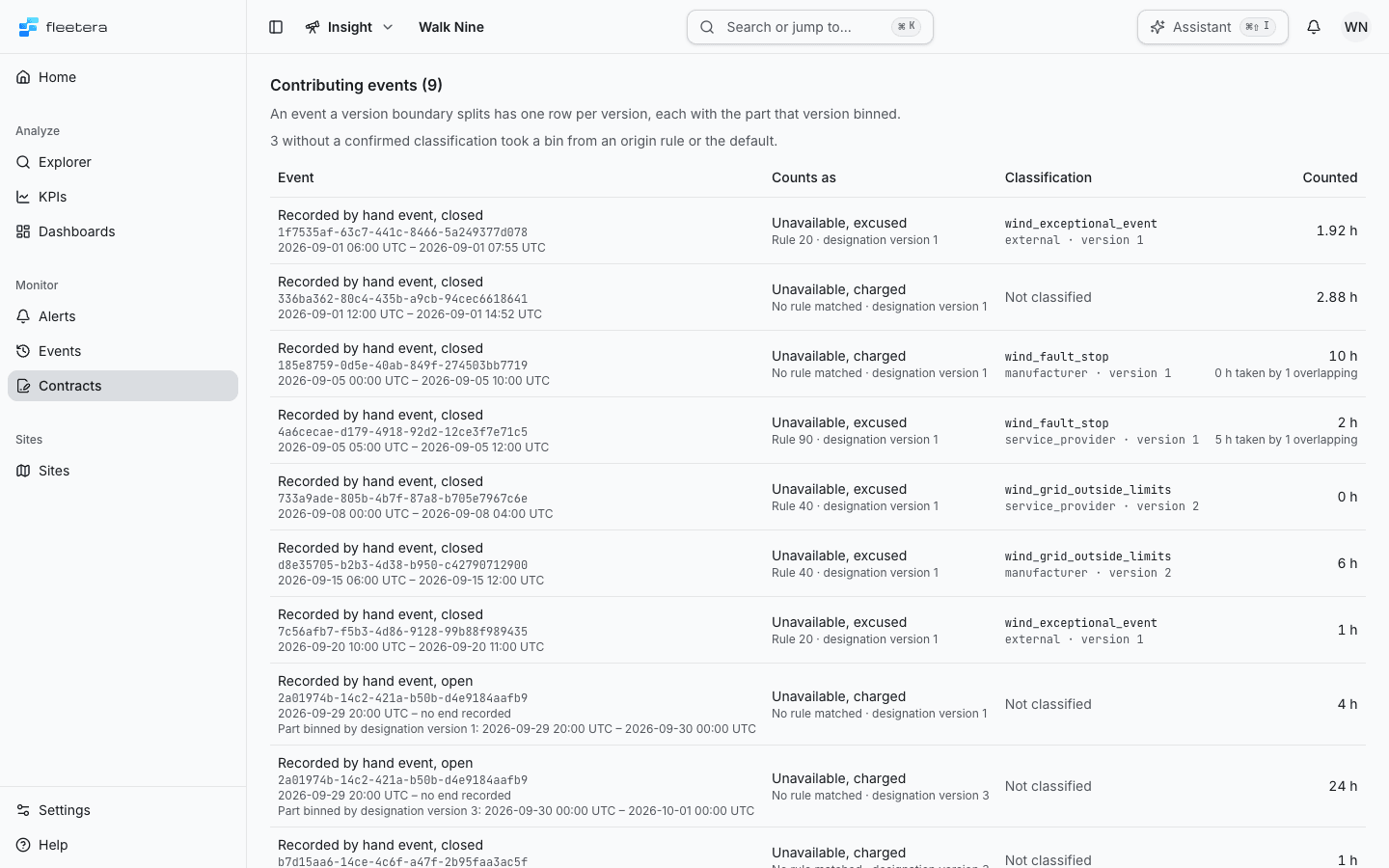
| Column | What it shows |
|---|---|
| Event | How it began and its state, for example Recorded by hand event, closed, its ID and its UTC times |
| Counts as | Its bin, and the rule that placed it there or No rule matched, with the designation version |
| Classification | The confirmed category and responsibility party codes and the classification version, or Not classified |
| Counted | The hours it counts in this period. When it overlaps another event on the same unit, the hours the other event took |
| Lost output in period | Its lost output inside the period, its method and quality, or Not available with the reason |
An event a version boundary splits has one row per version, each with the part that version binned. A line above the table says how many events without a confirmed classification took a bin from an origin rule or the default.
An event whose start and end are the same instant lasts no time. It contributes no elapsed time to any bin, and it does not appear under Contributing events or in the availability export. It is not listed under Excluded events either.
Excluded events lists events on the covered sites that do not count, with the reason: Not on a counted unit, Unit is on a site this contract does not cover, Unit category is not counted by the pack, Asset no longer found or Site no longer found.
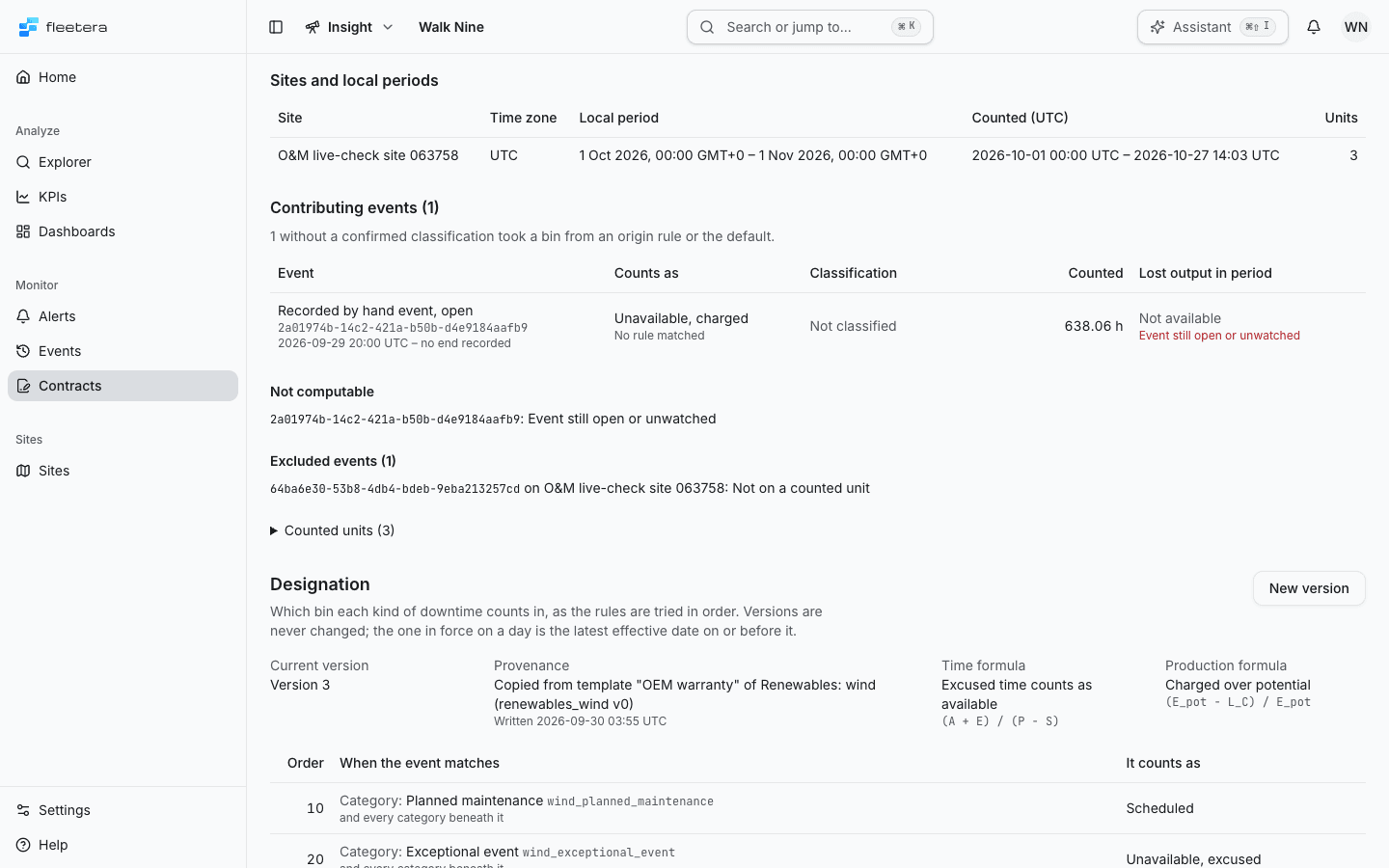
Counted units expands to each unit, its site, its counted hours and what it produced. A unit with no commissioning or retirement date counts for the whole period, and says so.
Export the figures
Choose Export CSV beside the period to download the period as availability- followed by the contract ID and the period start. The export follows the Designation version you chose.
The two exports answer different questions:
| Export | Where | What it is for |
|---|---|---|
| Availability export | A contract's Availability | Every row needed to recompute both figures for one contract and period: the summary and basis, each figure and bin, the governing designation versions, each site, each counted unit, each contributing event with its bin, rule, classification version and counted time, and each excluded event |
| Events export | Events | The recorded events that match your filters, across every contract and none: times, origin, state, confirmed classification and lost output, up to 5,000 events |
Use the availability export to check or reproduce a contract figure, and the events export to keep or analyse the event record.
When the figures cannot be computed
The section shows the reason in the product's words, what to do next, and Compute again.
- No designation was in force on the period's first counted day. Write a version in force from that day, or choose one version for the whole period.
- That period has not started yet, or lies outside the contract's dates. Choose another period.
- The period holds more events than one computation reads, more than 20,000. The contract cannot be computed for that period as it stands.
- No single installed pack says which assets are the units of these sites. A designation copied from a pack template names one pack.
- Site and unit data could not be read. Try again.
- The service was busy. Try again after the wait the page names.
A failed export shows its reason above the figures and leaves the figures on screen; try the export again.