%22%2F%3E%3Cpath%20d%3D%22M80%2019.0476C80%2021.8529%2077.4958%2024%2074.4487%2024H38.1027C37.5097%2024%2036.9205%2024.088%2036.358%2024.2607L35.6865%2024.4667C34.039%2024.9723%2033.0561%2026.2588%2032.507%2027.7756L32.2831%2028.3938C32.0956%2028.9117%2032%2029.4541%2032%2030V43.144C32%2045.9492%2029.322%2048%2026.275%2048H5.58529C2.53821%2048%200%2045.9799%200%2043.1746V29.2064C0%2026.4011%202.5131%2023.9667%205.56018%2023.9667H25.3545C25.9475%2023.9667%2026.5366%2023.8787%2027.0992%2023.7061L27.7707%2023.5C29.4182%2022.9944%2030.9439%2021.9645%2031.493%2020.4478L31.7169%2019.8296C31.9044%2019.3117%2032%2018.7693%2032%2018.2234V5.07937C32%202.27411%2034.1943%200%2037.2414%200H74.4828C77.5298%200%2080%202.27411%2080%205.07937V19.0476Z%22%20fill%3D%22url(%23b)%22%2F%3E%3Cdefs%3E%3ClinearGradient%20id%3D%22a%22%20x1%3D%220%22%20y1%3D%2280%22%20x2%3D%2280%22%20y2%3D%220%22%20gradientUnits%3D%22userSpaceOnUse%22%3E%3Cstop%20stop-color%3D%22%236B7280%22%2F%3E%3Cstop%20offset%3D%22.9%22%20stop-color%3D%22%239CA3AF%22%2F%3E%3C%2FlinearGradient%3E%3ClinearGradient%20id%3D%22b%22%20x1%3D%220%22%20y1%3D%2280%22%20x2%3D%2280%22%20y2%3D%220%22%20gradientUnits%3D%22userSpaceOnUse%22%3E%3Cstop%20stop-color%3D%22%236B7280%22%2F%3E%3Cstop%20offset%3D%22.9%22%20stop-color%3D%22%239CA3AF%22%2F%3E%3C%2FlinearGradient%3E%3C%2Fdefs%3E%3C%2Fsvg%3E)
%22%2F%3E%3Cpath%20d%3D%22M80%2019.0476C80%2021.8529%2077.4958%2024%2074.4487%2024H38.1027C37.5097%2024%2036.9205%2024.088%2036.358%2024.2607L35.6865%2024.4667C34.039%2024.9723%2033.0561%2026.2588%2032.507%2027.7756L32.2831%2028.3938C32.0956%2028.9117%2032%2029.4541%2032%2030V43.144C32%2045.9492%2029.322%2048%2026.275%2048H5.58529C2.53821%2048%200%2045.9799%200%2043.1746V29.2064C0%2026.4011%202.5131%2023.9667%205.56018%2023.9667H25.3545C25.9475%2023.9667%2026.5366%2023.8787%2027.0992%2023.7061L27.7707%2023.5C29.4182%2022.9944%2030.9439%2021.9645%2031.493%2020.4478L31.7169%2019.8296C31.9044%2019.3117%2032%2018.7693%2032%2018.2234V5.07937C32%202.27411%2034.1943%200%2037.2414%200H74.4828C77.5298%200%2080%202.27411%2080%205.07937V19.0476Z%22%20fill%3D%22url(%23b)%22%2F%3E%3Cdefs%3E%3ClinearGradient%20id%3D%22a%22%20x1%3D%220%22%20y1%3D%2280%22%20x2%3D%2280%22%20y2%3D%220%22%20gradientUnits%3D%22userSpaceOnUse%22%3E%3Cstop%20stop-color%3D%22%230061FF%22%2F%3E%3Cstop%20offset%3D%22.9%22%20stop-color%3D%22%2360EFFF%22%2F%3E%3C%2FlinearGradient%3E%3ClinearGradient%20id%3D%22b%22%20x1%3D%220%22%20y1%3D%2280%22%20x2%3D%2280%22%20y2%3D%220%22%20gradientUnits%3D%22userSpaceOnUse%22%3E%3Cstop%20stop-color%3D%22%230061FF%22%2F%3E%3Cstop%20offset%3D%22.9%22%20stop-color%3D%22%2360EFFF%22%2F%3E%3C%2FlinearGradient%3E%3C%2Fdefs%3E%3C%2Fsvg%3E)
Command Definitions
Declare commands on an asset template, choose their risk level, and sync them to the assets that already exist.
A command definition declares a command once, on an asset template: for example, "Set curtailment cap" on a plant template, or "Reset fault" on a motor template. Every asset made from the template carries its own copy of the command, which you then bind to a point on that asset's equipment.
Where definitions live
- Open Templates and choose the template.
- Open its Commands section. The Command Definitions card lists the template's commands with their type, category, risk level and timeout.
- Select Add Command. On a template with no commands yet, the button reads Add First Command.
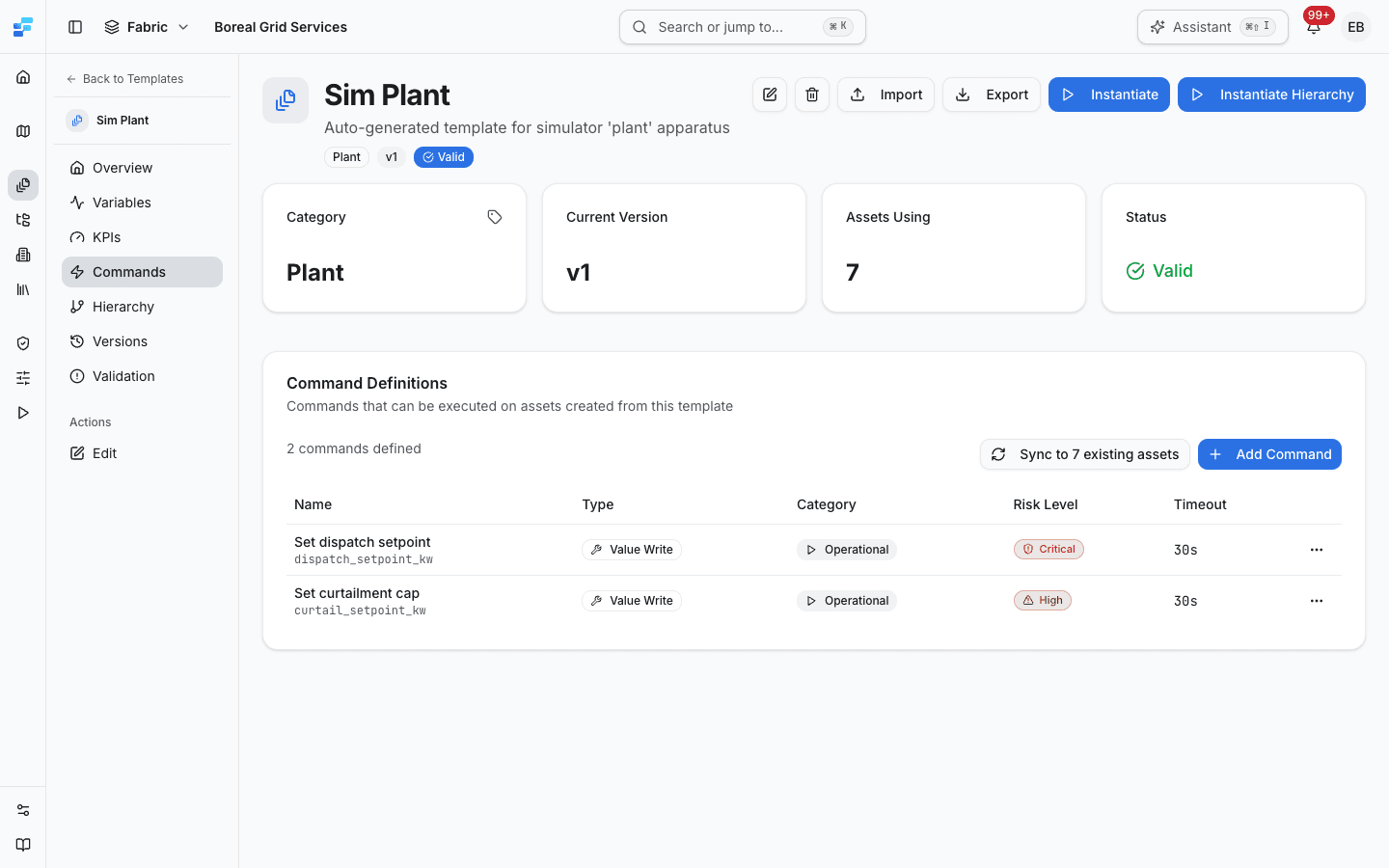
New definitions are added to the template's current version. A template with no version yet asks you to create one first. To change or delete a definition, open the menu at the end of its row and choose Edit or Delete.
Operators and admins can add and edit definitions. Only admins can delete one. When your role cannot add, change or delete definitions, a line under the count says so.
Definition fields
The Add Command Definition dialog (Edit Command Definition when you edit one) has these fields:
| Field | Required | Description |
|---|---|---|
| Name | Yes | The name people see, for example "Set curtailment cap". High-risk and critical commands are confirmed by typing this name exactly. |
| Key | Yes | The identifier used by the API and the bindings, for example curtail_setpoint_kw. It is filled in from the name, and it cannot be changed after the command is created. |
| Description | No | What the command does. It is shown on the asset's Commands section, in the send dialog and on the Execute Command wizard. |
| Command Type | Yes | Value Write or Method Call. It cannot be changed after the command is created. |
| Category | Yes | Operational, Diagnostic or Configuration. Defaults to Operational. |
| Risk Level | Yes | Low, Standard, High or Critical. Defaults to Standard. It decides how the command is confirmed, see Risk levels. |
| Timeout (seconds) | Yes | How long Fleetera waits for the equipment's answer before it closes the record as expired. Defaults to 30 seconds. |
| Expected Duration (seconds) | No | How long the command usually takes. For information only. |
Select Create Command to save a new definition, or Update Command to save changes.
Safety functions are never commandable through Fleetera. The keys emergency_stop and e_stop are refused, whatever their capitals or separators, and the Emergency category is not offered. A command that still carries it from before must be moved to another category before it can be saved again. To stop equipment from Fleetera, declare an ordinary operational command such as stop_turbine, and keep the emergency stop in the plant's local safety chain.
Command types
Value Write
A value write sends one value to one point on the equipment: a setpoint, an operating mode, or a flag. After the write, the gateway reads the point back, and the record says whether the equipment holds the value that was written. Value writes work over OPC UA and Modbus.
Method Call
A method call runs a method on an OPC UA object, for example a reset or a calibration routine. Method calls are limited today:
- OPC UA only. A Modbus connector cannot carry a method call.
- No input arguments. Fleetera refuses a method call whose command declares parameters, or that is sent with parameters, and sends nothing. Use method calls only for methods that take no arguments.
- Only through a gateway that can run them. The gateway's runtime reports which command types it can run. If it does not report method calls, the command shows Gateway cannot run it or Not determined and cannot be sent.
- No read-back. A method call that completes shows Completed with no verification, because there is no value to read back.
Categories
| Category | Use it for |
|---|---|
| Operational | Day-to-day commands: start, stop, a setpoint |
| Diagnostic | Diagnostic and troubleshooting commands |
| Configuration | Configuration changes, such as a limit or a threshold |
The Execute Command wizard groups commands by category.
Risk levels
The risk level decides how a command is confirmed. It cannot be switched off for a single command, and Fleetera checks it on the server, so it applies to the API as well as the app.
| Risk Level | Sent to one asset | Sent in bulk |
|---|---|---|
| Low | Sent when you select Send | Allowed |
| Standard | Sent when you select Send | Allowed |
| High | You type the command's exact name to confirm | Allowed. You type the name on the Review step |
| Critical | You type the command's exact name. Then, if your organization has turned on two-person approval, the request waits for an approver; otherwise it is sent | Refused, whatever the approval setting |
Two-person approval is an organization setting, off unless an admin turns it on. See Critical commands and approval.
Choose risk levels deliberately. Mark a command High or Critical when a wrong value could damage equipment, trip a plant or break a grid obligation.
Parameters schema
A command can take parameters, such as the value a setpoint command writes. Each parameter can have a label, a type, a unit, a minimum, a maximum, and whether it is required. When someone sends the command, Fleetera shows a field for each parameter with its unit and range, and will not send a value outside the range.
The definition dialog does not edit parameters. They arrive with the template when you import it: each entry in the template file's commands list can carry a parametersSchema. For example:
{
  "key": "curtail_setpoint_kw",
  "name": "Set curtailment cap",
  "commandType": "value_write",
  "category": "operational",
  "riskLevel": "high",
  "timeoutMs": 30000,
  "parametersSchema": {
    "type": "object",
    "required": ["limitKw"],
    "properties": {
      "limitKw": {
        "type": "number",
        "title": "Curtailment cap",
        "unit": "kW",
        "minimum": 0
      }
    }
  }
}
Two more keywords on the written parameter widen the read-back comparison, in the parameter's own units: readbackTolerance (an absolute difference, for example 0.5) and readbackRelativeTolerance (a fraction, for example 0.001). Without them, a numeric read-back must match the written value to within one part in a million.
A command bound to a Modbus coil must declare a parameter of type boolean, see Coils need a boolean parameter.
From definitions to commands on assets
When you create an asset from a template, the asset gets its own copy of each of the template's commands. An asset that already existed when a command was added does not get it until you sync.
Each copy keeps the name, risk level, timeout and parameters it was created with. Editing a definition later changes what new copies get, not the commands already on assets. The send dialog and the record show the asset's own copy, which is why the same command can carry a different risk on different assets.
Sync to existing assets
The Sync to existing assets button on the template's Commands section puts the template's commands on every asset already made from it. When the asset count can be read, the button names it, for example Sync to 7 existing assets. It is available to operators and admins.
The Sync commands to existing assets dialog says, before anything runs:
- how many existing assets use the template;
- the keys of the commands the sync adds to each asset that does not have them yet;
- whether any definition is missing from the command catalogue, which the sync adds first.
Select the sync button in the dialog to run it. The sync only adds what is missing. An asset keeps every command it already has, and a command already on an asset is not changed to match the definition. Running it again creates nothing new.
The result lists definitions and command instances created or already present, and how many assets were synced. If some assets failed, the dialog is titled Sync finished with failures, names the assets that failed with the reason, and says that everything else went through. Running the sync again is safe.
The button is unavailable, with the reason beside it, when no assets use the template yet or when the template has no commands.