%22%2F%3E%3Cpath%20d%3D%22M80%2019.0476C80%2021.8529%2077.4958%2024%2074.4487%2024H38.1027C37.5097%2024%2036.9205%2024.088%2036.358%2024.2607L35.6865%2024.4667C34.039%2024.9723%2033.0561%2026.2588%2032.507%2027.7756L32.2831%2028.3938C32.0956%2028.9117%2032%2029.4541%2032%2030V43.144C32%2045.9492%2029.322%2048%2026.275%2048H5.58529C2.53821%2048%200%2045.9799%200%2043.1746V29.2064C0%2026.4011%202.5131%2023.9667%205.56018%2023.9667H25.3545C25.9475%2023.9667%2026.5366%2023.8787%2027.0992%2023.7061L27.7707%2023.5C29.4182%2022.9944%2030.9439%2021.9645%2031.493%2020.4478L31.7169%2019.8296C31.9044%2019.3117%2032%2018.7693%2032%2018.2234V5.07937C32%202.27411%2034.1943%200%2037.2414%200H74.4828C77.5298%200%2080%202.27411%2080%205.07937V19.0476Z%22%20fill%3D%22url(%23b)%22%2F%3E%3Cdefs%3E%3ClinearGradient%20id%3D%22a%22%20x1%3D%220%22%20y1%3D%2280%22%20x2%3D%2280%22%20y2%3D%220%22%20gradientUnits%3D%22userSpaceOnUse%22%3E%3Cstop%20stop-color%3D%22%236B7280%22%2F%3E%3Cstop%20offset%3D%22.9%22%20stop-color%3D%22%239CA3AF%22%2F%3E%3C%2FlinearGradient%3E%3ClinearGradient%20id%3D%22b%22%20x1%3D%220%22%20y1%3D%2280%22%20x2%3D%2280%22%20y2%3D%220%22%20gradientUnits%3D%22userSpaceOnUse%22%3E%3Cstop%20stop-color%3D%22%236B7280%22%2F%3E%3Cstop%20offset%3D%22.9%22%20stop-color%3D%22%239CA3AF%22%2F%3E%3C%2FlinearGradient%3E%3C%2Fdefs%3E%3C%2Fsvg%3E)
%22%2F%3E%3Cpath%20d%3D%22M80%2019.0476C80%2021.8529%2077.4958%2024%2074.4487%2024H38.1027C37.5097%2024%2036.9205%2024.088%2036.358%2024.2607L35.6865%2024.4667C34.039%2024.9723%2033.0561%2026.2588%2032.507%2027.7756L32.2831%2028.3938C32.0956%2028.9117%2032%2029.4541%2032%2030V43.144C32%2045.9492%2029.322%2048%2026.275%2048H5.58529C2.53821%2048%200%2045.9799%200%2043.1746V29.2064C0%2026.4011%202.5131%2023.9667%205.56018%2023.9667H25.3545C25.9475%2023.9667%2026.5366%2023.8787%2027.0992%2023.7061L27.7707%2023.5C29.4182%2022.9944%2030.9439%2021.9645%2031.493%2020.4478L31.7169%2019.8296C31.9044%2019.3117%2032%2018.7693%2032%2018.2234V5.07937C32%202.27411%2034.1943%200%2037.2414%200H74.4828C77.5298%200%2080%202.27411%2080%205.07937V19.0476Z%22%20fill%3D%22url(%23b)%22%2F%3E%3Cdefs%3E%3ClinearGradient%20id%3D%22a%22%20x1%3D%220%22%20y1%3D%2280%22%20x2%3D%2280%22%20y2%3D%220%22%20gradientUnits%3D%22userSpaceOnUse%22%3E%3Cstop%20stop-color%3D%22%230061FF%22%2F%3E%3Cstop%20offset%3D%22.9%22%20stop-color%3D%22%2360EFFF%22%2F%3E%3C%2FlinearGradient%3E%3ClinearGradient%20id%3D%22b%22%20x1%3D%220%22%20y1%3D%2280%22%20x2%3D%2280%22%20y2%3D%220%22%20gradientUnits%3D%22userSpaceOnUse%22%3E%3Cstop%20stop-color%3D%22%230061FF%22%2F%3E%3Cstop%20offset%3D%22.9%22%20stop-color%3D%22%2360EFFF%22%2F%3E%3C%2FlinearGradient%3E%3C%2Fdefs%3E%3C%2Fsvg%3E)
Fleet Control
Send governed, recorded supervisory commands to your equipment through your Fleetera Edge gateways, with a person in command of every send.
Fleet Control is Fleetera's command layer. It lets your team change a setpoint or run an action on equipment from the Fleetera app, through the same Fleetera Edge gateways that collect your telemetry. Every command is declared in advance, sent by a person, checked against your rules before anything leaves the cloud, and recorded with what the equipment answered.
Fleet Control is supervisory. It sits above your plant controllers (PLC, turbine controller, BMS, PCS or EMS) and never replaces them. A command travels through the cloud and the gateway and can take seconds to reach the equipment, so Fleet Control never takes the place of the control loops in your controllers. It is human in command: a person sends every command, and nothing is scheduled, triggered by a rule or sent on its own.
Safety functions are never commandable through Fleetera. An emergency stop belongs to the plant's local safety chain. Fleetera refuses a command named as an emergency stop, and it does not offer an Emergency category for new commands.
The Command space
Fleet Control opens on the Command space. Its sidebar has these pages:
| Page | What it is for | Who sees it |
|---|---|---|
| Overview | What waits for approval, what is running, the outcomes of the last 24 hours and how much of the fleet can be commanded | Everyone |
| Execute Command | Send one command to up to 50 assets in a staged rollout. See Bulk Runs | Operators and admins |
| Approvals | Critical commands that wait for an approver. See Sending Commands | Admins |
| Command History | Every command requested in your organization, with its record. See Command History | Everyone |
| Bulk runs | Every bulk run and its rollout, under Command History | Everyone |
| Coverage | Which assets can be commanded, and what fixes the rest. See Coverage and Readiness | Everyone |
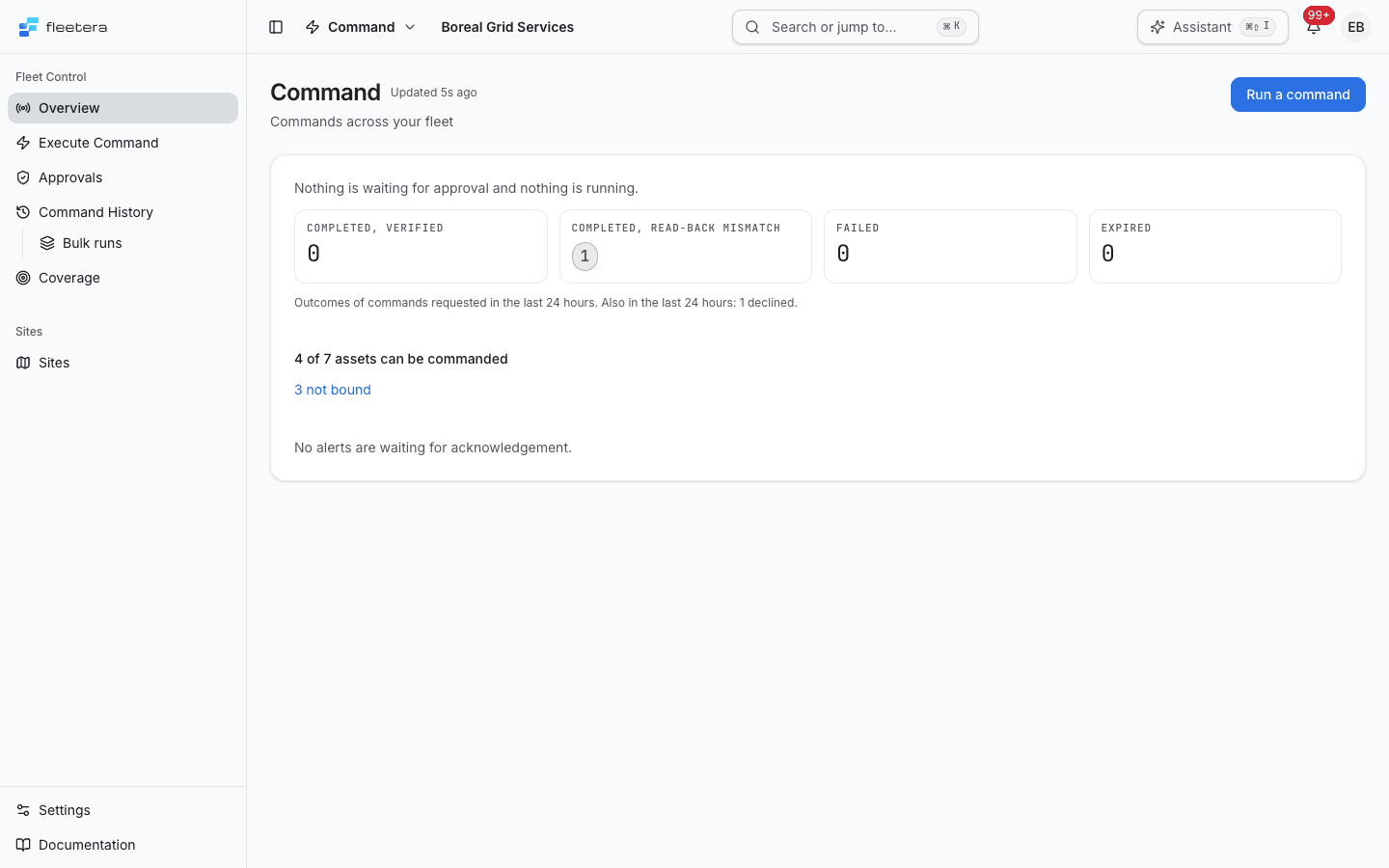
The Overview refreshes on its own every 30 seconds and says when it last did. Each outcome tile with something in it opens those commands in Command History. When your organization has no command yet, the Overview says so and links to the templates where commands are declared.
How the pieces fit
| Concept | What it is | Where you work with it |
|---|---|---|
| Command definition | A command declared on an asset template: its name, key, type, category, risk level and timeout | The template's Commands section. See Command Definitions |
| Command on an asset | The copy of a definition each asset carries. It keeps the name and risk level it was created with | The asset's Commands section |
| Command binding | Where on the equipment a command acts: a connector and an address, such as an OPC UA node or a Modbus register | The asset's Commands section. See Command Bindings |
| Readiness | Whether a command can be sent to an asset now, and if not, why | Coverage, the asset's Commands section and the Execute Command wizard |
| Execution record | One command request: who asked, what was sent, what the equipment answered and what was read back | Command History. See Command History |
| Bulk run | One command sent to many assets in batches | Bulk runs. See Bulk Runs |
Readiness describes one command on one asset at the moment it was read. A Ready command is not a promise that the equipment will accept the value, and other commands on the same asset can be in a different state. Fleetera checks the command again when it is sent.
What Fleet Control can do today
| Action | Protocols | Notes |
|---|---|---|
| Value write: write one value to a point, such as a setpoint or an operating mode | OPC UA, Modbus (one holding register or one coil) | After the write, the gateway reads the value back and the record says whether it matches. See Read-back |
| Method call: call a method on an OPC UA object | OPC UA only | Limited today: only methods that take no input arguments, and only through a gateway whose runtime reports that it can run method calls. No read-back |
A binding on a connector of any other protocol cannot be saved. Fleet Control does not schedule commands, repeat them, restore a value automatically after a time, or run them from alerts or rules.
Who can do what
Fleet Control follows your organization's roles. The same rules apply when a command is requested through the Fleetera API.
| Viewer | Operator | Admin | |
|---|---|---|---|
| See commands, Coverage, Command History and Bulk runs | Yes | Yes | Yes |
| Export Command History as CSV | Yes | Yes | Yes |
| Add and edit command definitions on a template | No | Yes | Yes |
| Delete a command definition | No | No | Yes |
| Sync a template's commands to existing assets, and bind commands | No | Yes | Yes |
| Send commands, run bulk runs, and pause, resume or abort a run | No | Yes | Yes |
| Approve or decline a critical command | No | No | Yes |
| Turn two-person approval on or off | No | No | Yes |
| Set or clear local control on a site or gateway | No | No | Yes |
See Governance and standards for risk levels, typed confirmation and two-person approval in one place.
Before you start
To send a command to an asset, you need:
- An asset template with the command declared on it, see Command Definitions
- The asset created from that template, or the command synced to it from the template
- An OPC UA or Modbus connector at the asset's site
- A binding from the command to an address on that connector
- An online edge gateway that manages the asset and runs that connector
- A plan that includes sending commands. Commands cannot be sent to equipment behind your own gateway during a trial, see Plans
Coverage tells you which of these is missing for each asset.
Command Definitions
Declare commands on a template and sync them to existing assets.
Command Bindings
Point each command at an OPC UA node, method or Modbus register.
Coverage and Readiness
See which assets can be commanded, and fix the rest.
Sending Commands
Send a command to one asset, with read-back and approval.
Bulk Runs
Send one command to up to 50 assets in a staged rollout.
Command History
Review, filter and export the command record.
Local Control
Hold a site or gateway under local control while people work on the equipment.
Governance and standards
How Fleet Control's controls relate to IEC 62443, IEC 61850 and NERC CIP.