%22%2F%3E%3Cpath%20d%3D%22M80%2019.0476C80%2021.8529%2077.4958%2024%2074.4487%2024H38.1027C37.5097%2024%2036.9205%2024.088%2036.358%2024.2607L35.6865%2024.4667C34.039%2024.9723%2033.0561%2026.2588%2032.507%2027.7756L32.2831%2028.3938C32.0956%2028.9117%2032%2029.4541%2032%2030V43.144C32%2045.9492%2029.322%2048%2026.275%2048H5.58529C2.53821%2048%200%2045.9799%200%2043.1746V29.2064C0%2026.4011%202.5131%2023.9667%205.56018%2023.9667H25.3545C25.9475%2023.9667%2026.5366%2023.8787%2027.0992%2023.7061L27.7707%2023.5C29.4182%2022.9944%2030.9439%2021.9645%2031.493%2020.4478L31.7169%2019.8296C31.9044%2019.3117%2032%2018.7693%2032%2018.2234V5.07937C32%202.27411%2034.1943%200%2037.2414%200H74.4828C77.5298%200%2080%202.27411%2080%205.07937V19.0476Z%22%20fill%3D%22url(%23b)%22%2F%3E%3Cdefs%3E%3ClinearGradient%20id%3D%22a%22%20x1%3D%220%22%20y1%3D%2280%22%20x2%3D%2280%22%20y2%3D%220%22%20gradientUnits%3D%22userSpaceOnUse%22%3E%3Cstop%20stop-color%3D%22%236B7280%22%2F%3E%3Cstop%20offset%3D%22.9%22%20stop-color%3D%22%239CA3AF%22%2F%3E%3C%2FlinearGradient%3E%3ClinearGradient%20id%3D%22b%22%20x1%3D%220%22%20y1%3D%2280%22%20x2%3D%2280%22%20y2%3D%220%22%20gradientUnits%3D%22userSpaceOnUse%22%3E%3Cstop%20stop-color%3D%22%236B7280%22%2F%3E%3Cstop%20offset%3D%22.9%22%20stop-color%3D%22%239CA3AF%22%2F%3E%3C%2FlinearGradient%3E%3C%2Fdefs%3E%3C%2Fsvg%3E)
%22%2F%3E%3Cpath%20d%3D%22M80%2019.0476C80%2021.8529%2077.4958%2024%2074.4487%2024H38.1027C37.5097%2024%2036.9205%2024.088%2036.358%2024.2607L35.6865%2024.4667C34.039%2024.9723%2033.0561%2026.2588%2032.507%2027.7756L32.2831%2028.3938C32.0956%2028.9117%2032%2029.4541%2032%2030V43.144C32%2045.9492%2029.322%2048%2026.275%2048H5.58529C2.53821%2048%200%2045.9799%200%2043.1746V29.2064C0%2026.4011%202.5131%2023.9667%205.56018%2023.9667H25.3545C25.9475%2023.9667%2026.5366%2023.8787%2027.0992%2023.7061L27.7707%2023.5C29.4182%2022.9944%2030.9439%2021.9645%2031.493%2020.4478L31.7169%2019.8296C31.9044%2019.3117%2032%2018.7693%2032%2018.2234V5.07937C32%202.27411%2034.1943%200%2037.2414%200H74.4828C77.5298%200%2080%202.27411%2080%205.07937V19.0476Z%22%20fill%3D%22url(%23b)%22%2F%3E%3Cdefs%3E%3ClinearGradient%20id%3D%22a%22%20x1%3D%220%22%20y1%3D%2280%22%20x2%3D%2280%22%20y2%3D%220%22%20gradientUnits%3D%22userSpaceOnUse%22%3E%3Cstop%20stop-color%3D%22%230061FF%22%2F%3E%3Cstop%20offset%3D%22.9%22%20stop-color%3D%22%2360EFFF%22%2F%3E%3C%2FlinearGradient%3E%3ClinearGradient%20id%3D%22b%22%20x1%3D%220%22%20y1%3D%2280%22%20x2%3D%2280%22%20y2%3D%220%22%20gradientUnits%3D%22userSpaceOnUse%22%3E%3Cstop%20stop-color%3D%22%230061FF%22%2F%3E%3Cstop%20offset%3D%22.9%22%20stop-color%3D%22%2360EFFF%22%2F%3E%3C%2FlinearGradient%3E%3C%2Fdefs%3E%3C%2Fsvg%3E)
Sending Commands
Send a command to one asset from its Commands section, check the current value first, and read what the equipment answered.
You send a command to one asset from that asset's Commands section. To send the same command to several assets, use the Execute Command wizard instead.
The asset's Commands section
Open the asset, then Commands. Every command the asset carries is listed, with one row per command:
| Column | What it shows |
|---|---|
| Command | The name, the risk level and what the risk means here: Sent directly, Typed confirmation, Waits for an approver or No approver, organization setting. Below them, the description and the connector the command is bound to, or No binding |
| Readiness | Ready, or the state that stops the command, with its reason and fix link. See Readiness states |
| Current value | The last value read back from the point, and how old it is, or No value on record. A method call shows Runs an action, no value |
| Last request | The status of the last request for this command, linked to its record, or No request yet |
| Action | Send, Request approval, Bind or Edit binding, depending on the command and your role |
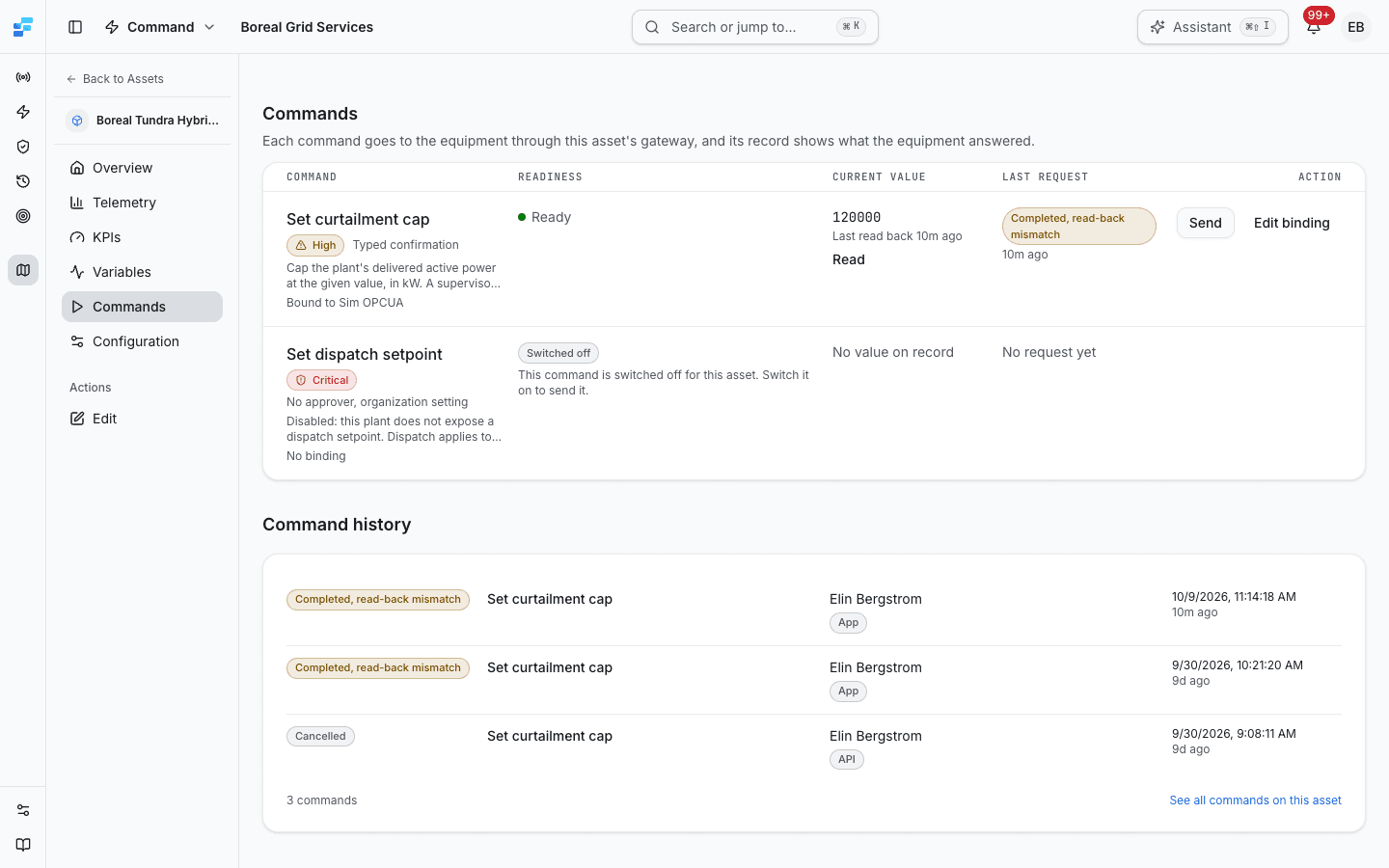
Send appears only on a Ready command, for operators and admins. A critical command shows Request approval instead when your organization requires an approver. When the site or the gateway is under local control, a banner above the table says who switched it on and why, and Send shows a lock and cannot be pressed. Switched-off commands are listed last.
On a ready value write, Read asks the gateway for the value the point holds now, without sending anything.
Below the table, Command history lists the asset's latest requests. See all commands on this asset opens Command History filtered to the asset.
Sending a command
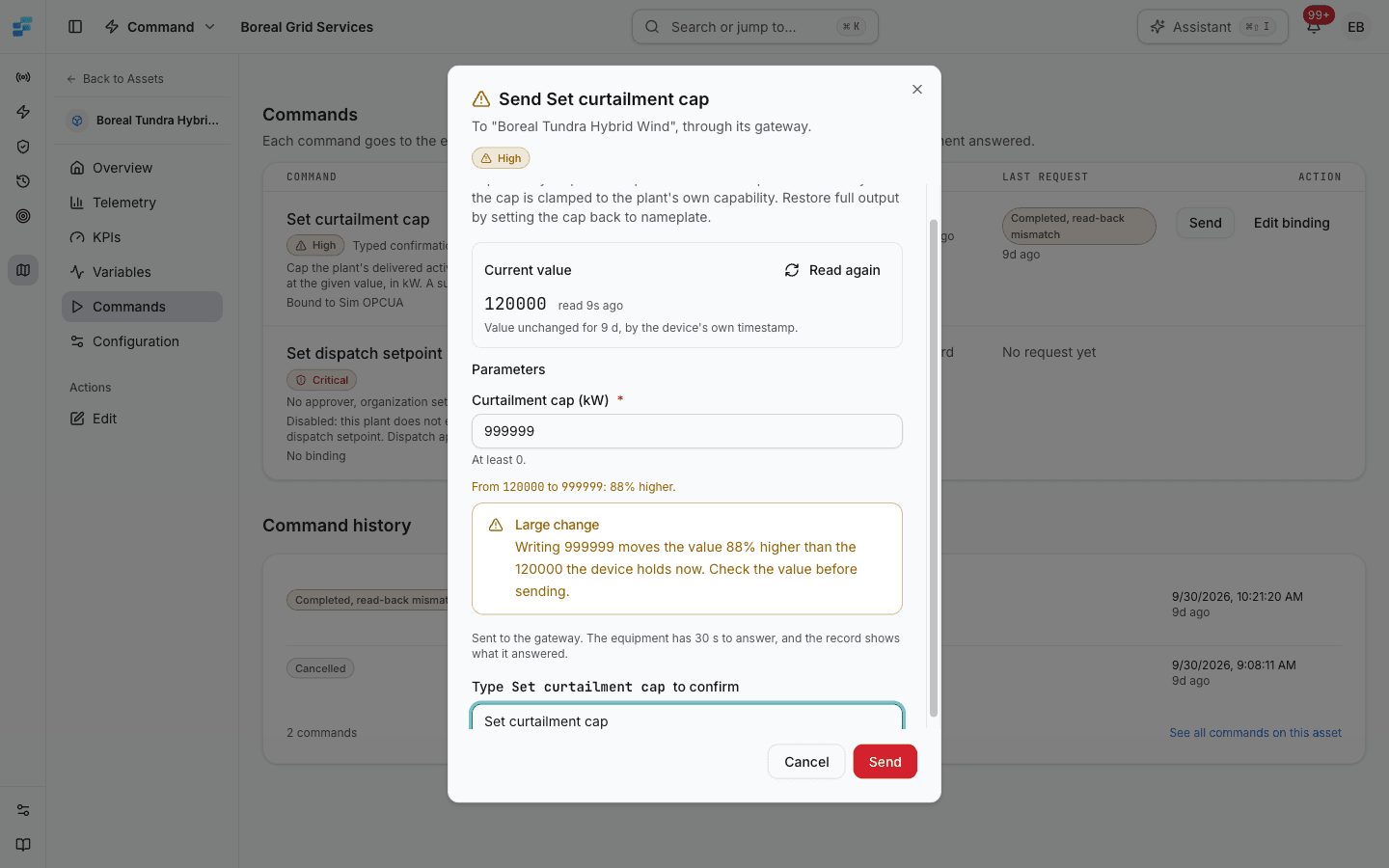
Select Send on the command's row. The dialog is titled Send and the command's name, and says where the command goes: to the asset, through its gateway. It shows, in this order:
- The command's risk level and description, and for a critical command what will happen when you confirm.
- Current value: the value the point holds, read when the dialog opened, with how long ago it was read.
- Parameters: a field for each value the command takes, with its unit and range.
- What the new value does to the current one.
- For a high-risk or critical command, a field to type the command's exact name.
Then select Send, or Request approval for a critical command that waits for an approver. A line above the button says why it is unavailable, for example a required parameter that is empty or a name that does not match yet.
The current value
The Current value panel reads the point when the dialog opens. Read again reads it once more.
- The value is shown with how long ago it was read. After two minutes it is marked stale, with a reminder to read it again before sending.
- When the device's own timestamp says the value has not changed for a while, the panel says for how long. A value that has not changed is not stale: the age of the read is what counts.
- If the value cannot be read, the panel says so and why. It is never shown as zero or left blank. The command can still be sent, but the change cannot be checked against what the device holds.
A method call has no value, so the dialog shows no panel for it. A gateway whose runtime predates current-value reads says so.
What the new value changes
Once a number is typed, the dialog compares it with the current value:
- the same value is said to be the same;
- a change states the old and new values and how far the value moves;
- a change of more than 25 percent of the larger of the two values, or any change from zero, adds a Large change warning.
The warning is there to catch an extra or missing digit. It never blocks the send, and it is not a safety check on the equipment.
When the command cannot be sent
If the command is not ready when you open the dialog, the dialog shows the readiness state, its reason and the link that fixes it, followed by Nothing was sent. If local control is active, the dialog shows the local-control details instead of the form.
After you send
The dialog shows what Fleetera recorded: the status, a sentence about what that status means, and Open the record. The command's row follows the request until it settles. If no answer has arrived by the command's timeout, the row says so; the record shows the answer when it comes.
If the connection drops before the answer arrives, the dialog says the command is Not confirmed as sent. The values you entered stay as they were, and Send retries the same request: the equipment does not receive it twice. Closing the dialog during a send neither cancels the request nor sends it again. A retry with different values is refused, and the dialog offers Start a new request.
Statuses
| Status | What it means |
|---|---|
| Pending | Recorded and waiting to go to the gateway |
| Awaiting approval | A critical command waiting for an approver. Nothing has been sent |
| Sent to gateway | Sent, and waiting for the gateway's answer |
| Completed, verified | The equipment accepted the write and reads back the value written |
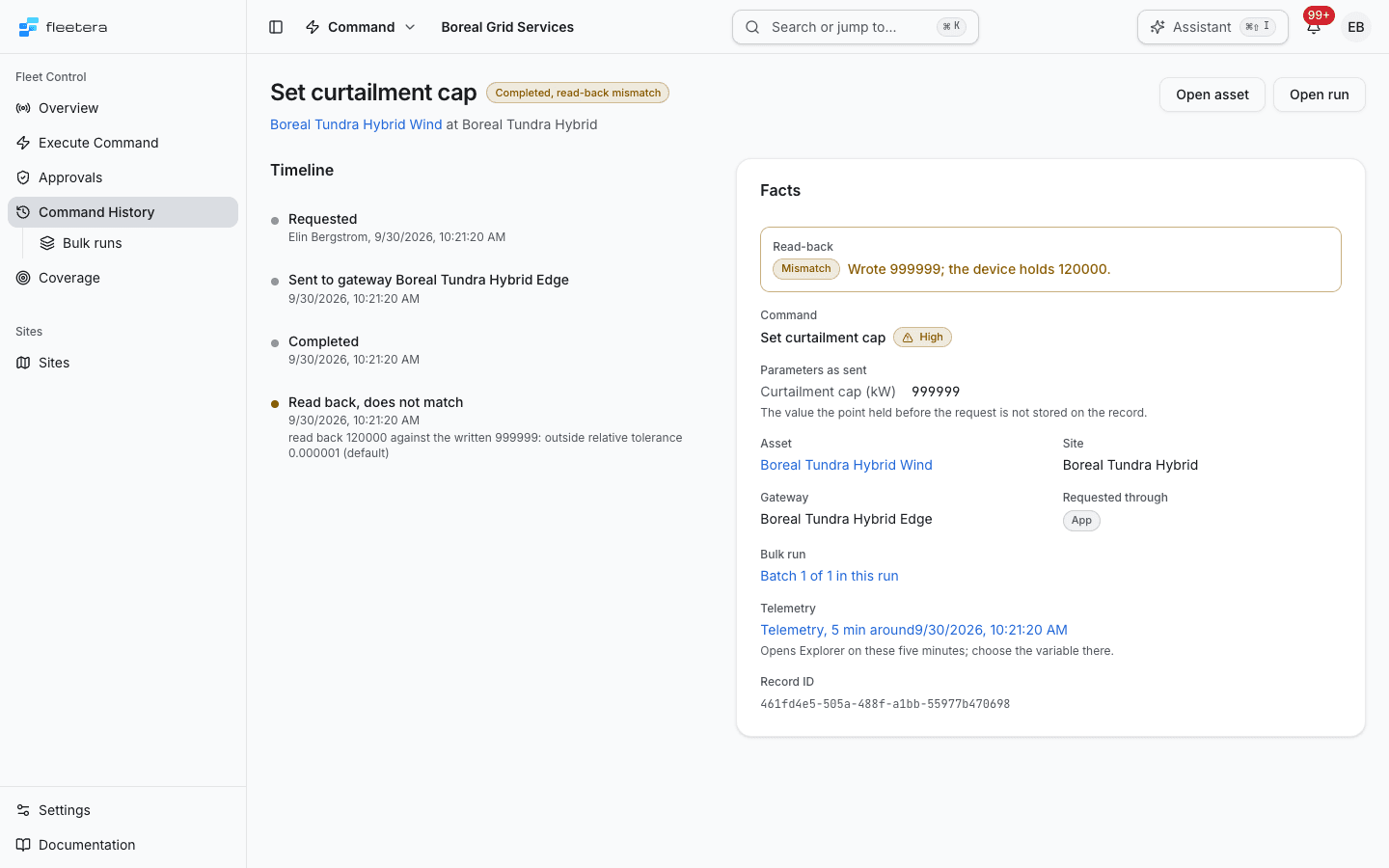
| Completed, read-back mismatch | The equipment accepted the write, but reads back a different value |
| Completed, not verified | The equipment accepted the write, but the value could not be read back |
| Completed | The gateway reported the command completed, with no read-back. This is what a method call shows |
| Failed | The command failed, or was refused before anything was sent, for example because the gateway was offline. The record says which |
| Declined | An approver declined the request, the requester withdrew it, or Fleetera refused the approval because the command changed. Nothing was sent |
| Expired | No answer arrived before the command's timeout, or nobody decided an approval request within its window |
| Cancelled | The request was cancelled before it was sent |
Read-back verification
After a successful write, the gateway reads the same point back, and the record compares the value it reads with the value written:
- Verified: the values match. Numbers match when they agree to within one part in a million, or within the tolerance the command's parameter declares.
- Mismatch: the device holds a different value. The status stays Completed, because the equipment accepted the write, and the record names both values. A mismatch is often deliberate on the equipment's side: a plant controller that clamps a setpoint to what the plant can do reads back the clamped value.
- Not verified: nothing could be read back, and the record gives the gateway's reason. The write may well have landed; whether the device holds it is not known. A gateway whose runtime predates read-back always records this.
A read-back is one reading, taken straight after the write. It confirms what the point held at that moment. It is not proof that the plant responded, or that it kept the value afterwards. The record links to the telemetry around the send so you can check that.
Timeouts and expiry
Each command has a timeout, 30 seconds unless its definition says otherwise. If no answer is recorded within it, Fleetera closes the record as Expired. If the command had been sent, the record says the outcome on the equipment is unknown, so check the asset before sending again.
Cancelling
A command that is still Pending can be cancelled from its record with Cancel before it is sent. Once a command has been sent to the gateway it cannot be recalled, and its record says so. A request awaiting approval is declined or withdrawn, not cancelled.
Critical commands and approval
A critical command always needs its exact name typed. Whether it then waits for a second person depends on your organization's Two-person approval for critical commands setting, under Settings, Governance. The setting is off unless an admin turns it on, and only an admin can change it. Every change is recorded with who made it and when.
- On: confirming creates a request, and nothing is sent until an approver other than the requester approves it. A request nobody decides within 24 hours expires, and nothing is sent.
- Off: the command is sent when you confirm it, without an approver, and its record notes that approval was not required.
The command's risk on that asset decides whether this applies. If the setting cannot be read, the dialog says so rather than promising either. Turning the setting off does not send requests that are already waiting: each still needs an approver. Critical commands are never sent in bulk, whatever the setting.
Deciding a request
Requests wait on Command, Approvals, which admins see. Each request is a card with the command, its risk, who requested it and when, when the approval window ends, the connector and address it will be sent to, the current value of the point, and the parameters, which were frozen when the command was requested.
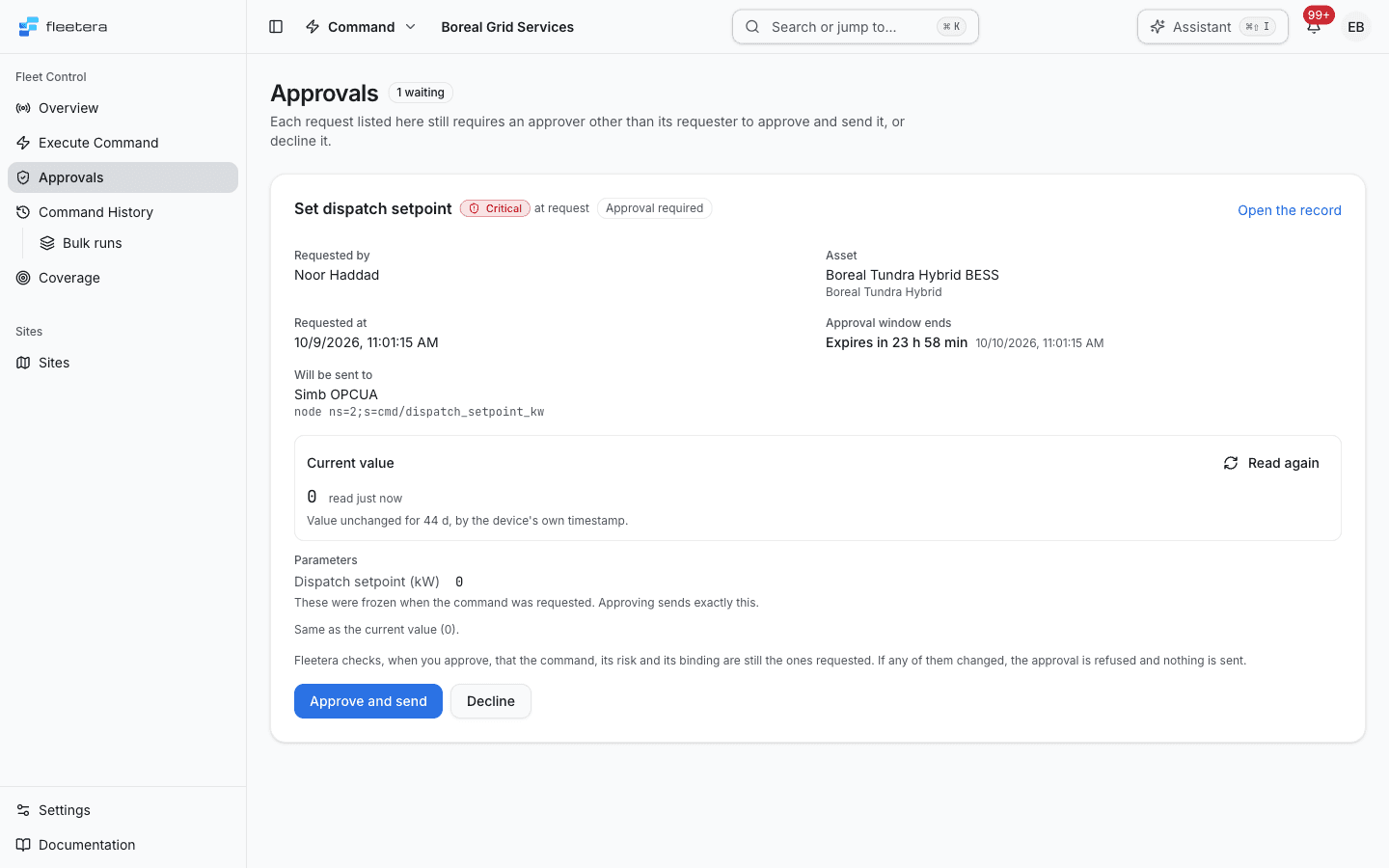
- Approve and send sends the command as requested. Fleetera first checks that the command, its risk and its binding are still the ones requested. If any of them changed, the approval is refused and nothing is sent. Approval is also refused while the target is under local control, and once the window has ended.
- Decline asks why, and records the reason for the requester. Nothing is sent.
- Withdraw appears when the requester is also an approver. It declines their own request.
Nobody can approve their own request. A requester who is not an approver follows the request on its record, where it says that an approver other than them must decide. The same decision appears on the record of a pending request, for an approver.
Requirements
A command can be sent to an asset only when its readiness is Ready: the command is switched on, bound, and reachable through an online gateway that can run it, your plan includes commands, and neither the site nor the gateway is under local control. Fleetera checks all of this again at the moment of sending. See Coverage and Readiness.