%22%2F%3E%3Cpath%20d%3D%22M80%2019.0476C80%2021.8529%2077.4958%2024%2074.4487%2024H38.1027C37.5097%2024%2036.9205%2024.088%2036.358%2024.2607L35.6865%2024.4667C34.039%2024.9723%2033.0561%2026.2588%2032.507%2027.7756L32.2831%2028.3938C32.0956%2028.9117%2032%2029.4541%2032%2030V43.144C32%2045.9492%2029.322%2048%2026.275%2048H5.58529C2.53821%2048%200%2045.9799%200%2043.1746V29.2064C0%2026.4011%202.5131%2023.9667%205.56018%2023.9667H25.3545C25.9475%2023.9667%2026.5366%2023.8787%2027.0992%2023.7061L27.7707%2023.5C29.4182%2022.9944%2030.9439%2021.9645%2031.493%2020.4478L31.7169%2019.8296C31.9044%2019.3117%2032%2018.7693%2032%2018.2234V5.07937C32%202.27411%2034.1943%200%2037.2414%200H74.4828C77.5298%200%2080%202.27411%2080%205.07937V19.0476Z%22%20fill%3D%22url(%23b)%22%2F%3E%3Cdefs%3E%3ClinearGradient%20id%3D%22a%22%20x1%3D%220%22%20y1%3D%2280%22%20x2%3D%2280%22%20y2%3D%220%22%20gradientUnits%3D%22userSpaceOnUse%22%3E%3Cstop%20stop-color%3D%22%236B7280%22%2F%3E%3Cstop%20offset%3D%22.9%22%20stop-color%3D%22%239CA3AF%22%2F%3E%3C%2FlinearGradient%3E%3ClinearGradient%20id%3D%22b%22%20x1%3D%220%22%20y1%3D%2280%22%20x2%3D%2280%22%20y2%3D%220%22%20gradientUnits%3D%22userSpaceOnUse%22%3E%3Cstop%20stop-color%3D%22%236B7280%22%2F%3E%3Cstop%20offset%3D%22.9%22%20stop-color%3D%22%239CA3AF%22%2F%3E%3C%2FlinearGradient%3E%3C%2Fdefs%3E%3C%2Fsvg%3E)
%22%2F%3E%3Cpath%20d%3D%22M80%2019.0476C80%2021.8529%2077.4958%2024%2074.4487%2024H38.1027C37.5097%2024%2036.9205%2024.088%2036.358%2024.2607L35.6865%2024.4667C34.039%2024.9723%2033.0561%2026.2588%2032.507%2027.7756L32.2831%2028.3938C32.0956%2028.9117%2032%2029.4541%2032%2030V43.144C32%2045.9492%2029.322%2048%2026.275%2048H5.58529C2.53821%2048%200%2045.9799%200%2043.1746V29.2064C0%2026.4011%202.5131%2023.9667%205.56018%2023.9667H25.3545C25.9475%2023.9667%2026.5366%2023.8787%2027.0992%2023.7061L27.7707%2023.5C29.4182%2022.9944%2030.9439%2021.9645%2031.493%2020.4478L31.7169%2019.8296C31.9044%2019.3117%2032%2018.7693%2032%2018.2234V5.07937C32%202.27411%2034.1943%200%2037.2414%200H74.4828C77.5298%200%2080%202.27411%2080%205.07937V19.0476Z%22%20fill%3D%22url(%23b)%22%2F%3E%3Cdefs%3E%3ClinearGradient%20id%3D%22a%22%20x1%3D%220%22%20y1%3D%2280%22%20x2%3D%2280%22%20y2%3D%220%22%20gradientUnits%3D%22userSpaceOnUse%22%3E%3Cstop%20stop-color%3D%22%230061FF%22%2F%3E%3Cstop%20offset%3D%22.9%22%20stop-color%3D%22%2360EFFF%22%2F%3E%3C%2FlinearGradient%3E%3ClinearGradient%20id%3D%22b%22%20x1%3D%220%22%20y1%3D%2280%22%20x2%3D%2280%22%20y2%3D%220%22%20gradientUnits%3D%22userSpaceOnUse%22%3E%3Cstop%20stop-color%3D%22%230061FF%22%2F%3E%3Cstop%20offset%3D%22.9%22%20stop-color%3D%22%2360EFFF%22%2F%3E%3C%2FlinearGradient%3E%3C%2Fdefs%3E%3C%2Fsvg%3E)
Coverage and Readiness
See which assets can be commanded, site by site, what stands in the way for the rest, and the link that fixes each gap.
Coverage answers one question for the whole fleet: which assets can be commanded right now, and what stops the others. Open Command, then Coverage.
Reading Coverage
The page header says how many assets with commands can be commanded, for example "4 of 7 assets can be commanded". The line under it says when the counts were made: counts are up to a minute old. Fleetera checks every command again when it is sent, so a count that has not caught up yet never lets a command through.
Each site has a row with its own sentence, for example "2 of 5 assets ready, 3 not bound". A site under local control also shows who switched it on, when and why. On each row:
- Show assets opens the site's assets; Hide assets closes them.
- Run on ready assets opens the Execute Command wizard with that site chosen. It appears when the site has ready assets and your role can send commands.
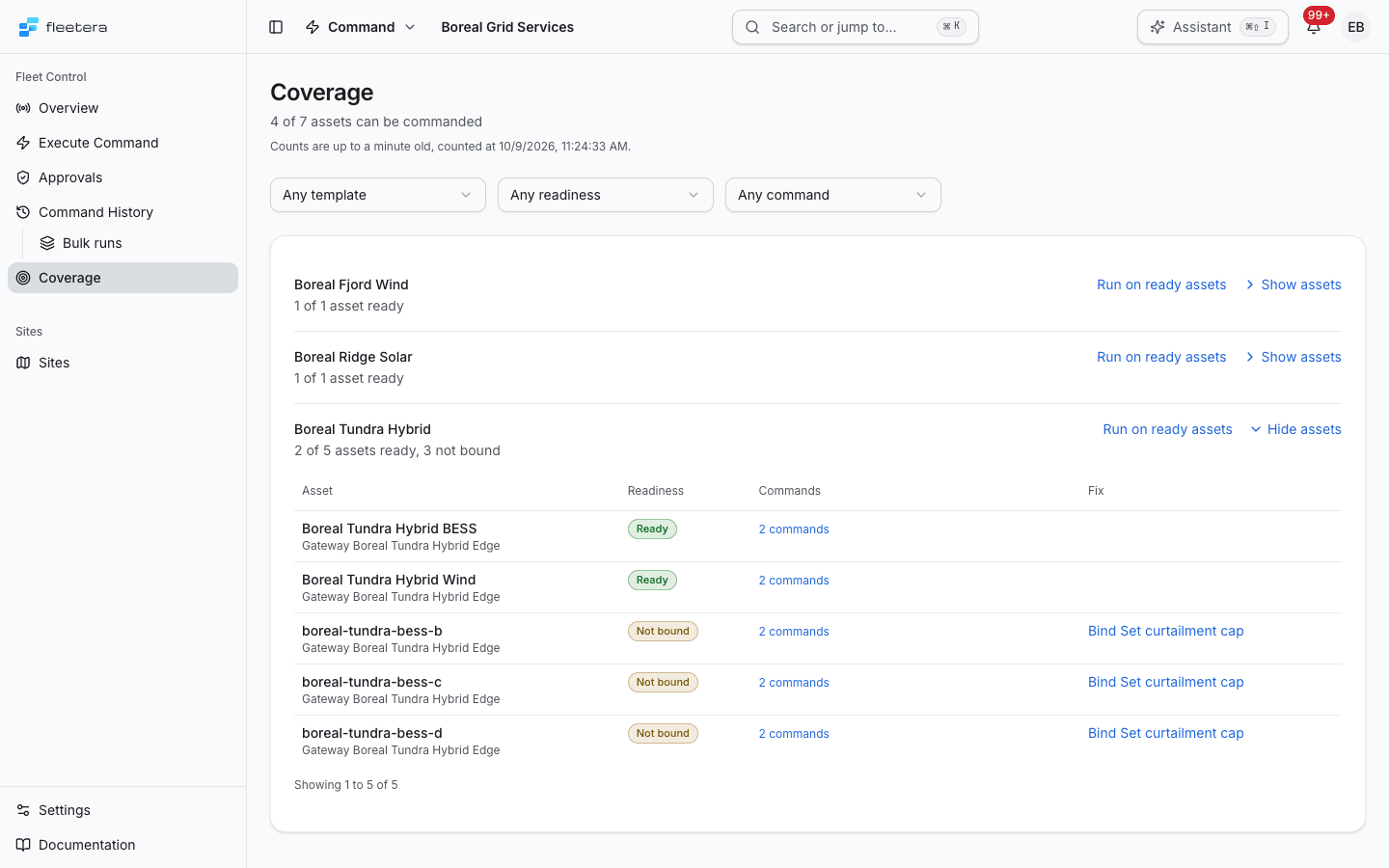
The open site lists its assets, 50 to a page:
| Column | What it shows |
|---|---|
| Asset | The asset's name and the gateway that manages it, or "No gateway resolved" |
| Readiness | The asset's readiness. Hover it for the reason |
| Commands | How many commands the asset has. Open it to see each command with its own readiness, its reason and its fix link |
| Fix | The one link that closes the asset's gap, for example Bind Set curtailment cap. Shown only to people who can send commands |
An asset is Ready when at least one of its commands is ready. Otherwise it takes the state of the command that is closest to ready, so its row names the next thing to fix.
Filters
Three filters narrow the page: Any template, Any readiness and Any command. Each choice is kept in the page address, so a filtered view can be shared as a link. The Overview's coverage line links here with the readiness filter already set, for example from "3 not bound".
Readiness states
The same readiness words appear on Coverage, on an asset's Commands section and in the Execute Command wizard. When several things are wrong, the state shown is the first in this table.
| State | What it means | What to do |
|---|---|---|
| Not permitted | Your role cannot send commands, or your organization is suspended. Shown only on the commands you look at, never in the counts | Ask an admin to change your role |
| Not in plan | Your plan does not include sending commands to equipment | View plan |
| Switched off | The command is switched off for this asset | The app has no control to switch a command on or off today. Contact Fleetera support |
| Not bound | The command has no binding, no gateway manages the asset, or the command is bound to a connector the asset's gateway does not run | Bind the command, or add a gateway at the site, or add the asset to a gateway's scope |
| Site under local control | The site is under local control | An admin switches the site back to remote control in Open site settings |
| Gateway under local control | The gateway reports that it is under local control | An admin clears it on the gateway's page |
| Gateway offline | The gateway is offline, or has never connected | Open gateway and bring it back online |
| Protocol cannot carry it | The command's connector cannot carry this kind of command, for example a method call bound to a Modbus connector | Bind it to a suitable connector, or change the command type |
| Gateway cannot run it | The gateway's runtime reports that it cannot run this kind of command, for example a method call | Update the gateway's runtime, or bind the command as a value write |
| Not determined | Something Fleetera needs to decide could not be read: for example, a gateway that has not reported its capabilities or its local-control state, or a site with several gateways none of which has reported yet | Follow the reason. A command that is not determined is never counted as ready and cannot be sent |
| Ready | Every check passed on what Fleetera knows | Send it |
Readiness is about one command on one asset at the moment it was read. Ready does not promise that the equipment will accept the value, and it says nothing about the asset's other commands.
Asset readiness and your role
The counts, the site sentences and the asset rows describe the equipment, so everyone sees the same numbers whatever their role. A missing permission to send is not a fault in the fleet, so Not permitted never appears in a count. It appears only on the per-command list, for a person whose role cannot send.
When no commands are declared
If your organization has not declared any command yet, Coverage shows the same starting point as the Overview, with Declare commands on a template and a link to Command Definitions.