%22%2F%3E%3Cpath%20d%3D%22M80%2019.0476C80%2021.8529%2077.4958%2024%2074.4487%2024H38.1027C37.5097%2024%2036.9205%2024.088%2036.358%2024.2607L35.6865%2024.4667C34.039%2024.9723%2033.0561%2026.2588%2032.507%2027.7756L32.2831%2028.3938C32.0956%2028.9117%2032%2029.4541%2032%2030V43.144C32%2045.9492%2029.322%2048%2026.275%2048H5.58529C2.53821%2048%200%2045.9799%200%2043.1746V29.2064C0%2026.4011%202.5131%2023.9667%205.56018%2023.9667H25.3545C25.9475%2023.9667%2026.5366%2023.8787%2027.0992%2023.7061L27.7707%2023.5C29.4182%2022.9944%2030.9439%2021.9645%2031.493%2020.4478L31.7169%2019.8296C31.9044%2019.3117%2032%2018.7693%2032%2018.2234V5.07937C32%202.27411%2034.1943%200%2037.2414%200H74.4828C77.5298%200%2080%202.27411%2080%205.07937V19.0476Z%22%20fill%3D%22url(%23b)%22%2F%3E%3Cdefs%3E%3ClinearGradient%20id%3D%22a%22%20x1%3D%220%22%20y1%3D%2280%22%20x2%3D%2280%22%20y2%3D%220%22%20gradientUnits%3D%22userSpaceOnUse%22%3E%3Cstop%20stop-color%3D%22%236B7280%22%2F%3E%3Cstop%20offset%3D%22.9%22%20stop-color%3D%22%239CA3AF%22%2F%3E%3C%2FlinearGradient%3E%3ClinearGradient%20id%3D%22b%22%20x1%3D%220%22%20y1%3D%2280%22%20x2%3D%2280%22%20y2%3D%220%22%20gradientUnits%3D%22userSpaceOnUse%22%3E%3Cstop%20stop-color%3D%22%236B7280%22%2F%3E%3Cstop%20offset%3D%22.9%22%20stop-color%3D%22%239CA3AF%22%2F%3E%3C%2FlinearGradient%3E%3C%2Fdefs%3E%3C%2Fsvg%3E)
%22%2F%3E%3Cpath%20d%3D%22M80%2019.0476C80%2021.8529%2077.4958%2024%2074.4487%2024H38.1027C37.5097%2024%2036.9205%2024.088%2036.358%2024.2607L35.6865%2024.4667C34.039%2024.9723%2033.0561%2026.2588%2032.507%2027.7756L32.2831%2028.3938C32.0956%2028.9117%2032%2029.4541%2032%2030V43.144C32%2045.9492%2029.322%2048%2026.275%2048H5.58529C2.53821%2048%200%2045.9799%200%2043.1746V29.2064C0%2026.4011%202.5131%2023.9667%205.56018%2023.9667H25.3545C25.9475%2023.9667%2026.5366%2023.8787%2027.0992%2023.7061L27.7707%2023.5C29.4182%2022.9944%2030.9439%2021.9645%2031.493%2020.4478L31.7169%2019.8296C31.9044%2019.3117%2032%2018.7693%2032%2018.2234V5.07937C32%202.27411%2034.1943%200%2037.2414%200H74.4828C77.5298%200%2080%202.27411%2080%205.07937V19.0476Z%22%20fill%3D%22url(%23b)%22%2F%3E%3Cdefs%3E%3ClinearGradient%20id%3D%22a%22%20x1%3D%220%22%20y1%3D%2280%22%20x2%3D%2280%22%20y2%3D%220%22%20gradientUnits%3D%22userSpaceOnUse%22%3E%3Cstop%20stop-color%3D%22%230061FF%22%2F%3E%3Cstop%20offset%3D%22.9%22%20stop-color%3D%22%2360EFFF%22%2F%3E%3C%2FlinearGradient%3E%3ClinearGradient%20id%3D%22b%22%20x1%3D%220%22%20y1%3D%2280%22%20x2%3D%2280%22%20y2%3D%220%22%20gradientUnits%3D%22userSpaceOnUse%22%3E%3Cstop%20stop-color%3D%22%230061FF%22%2F%3E%3Cstop%20offset%3D%22.9%22%20stop-color%3D%22%2360EFFF%22%2F%3E%3C%2FlinearGradient%3E%3C%2Fdefs%3E%3C%2Fsvg%3E)
Command History
Review every command requested in your organization, open its record, filter by status, read-back, origin, command and requester, and export the ledger as CSV.
Every command request is recorded: who asked, which command went to which asset, what was sent, what the equipment answered and what was read back. Everyone in your organization can read the history, whatever their role.
Command History
Open Command, then Command History. The list holds every command requested in your organization, newest first, 25 to a page.
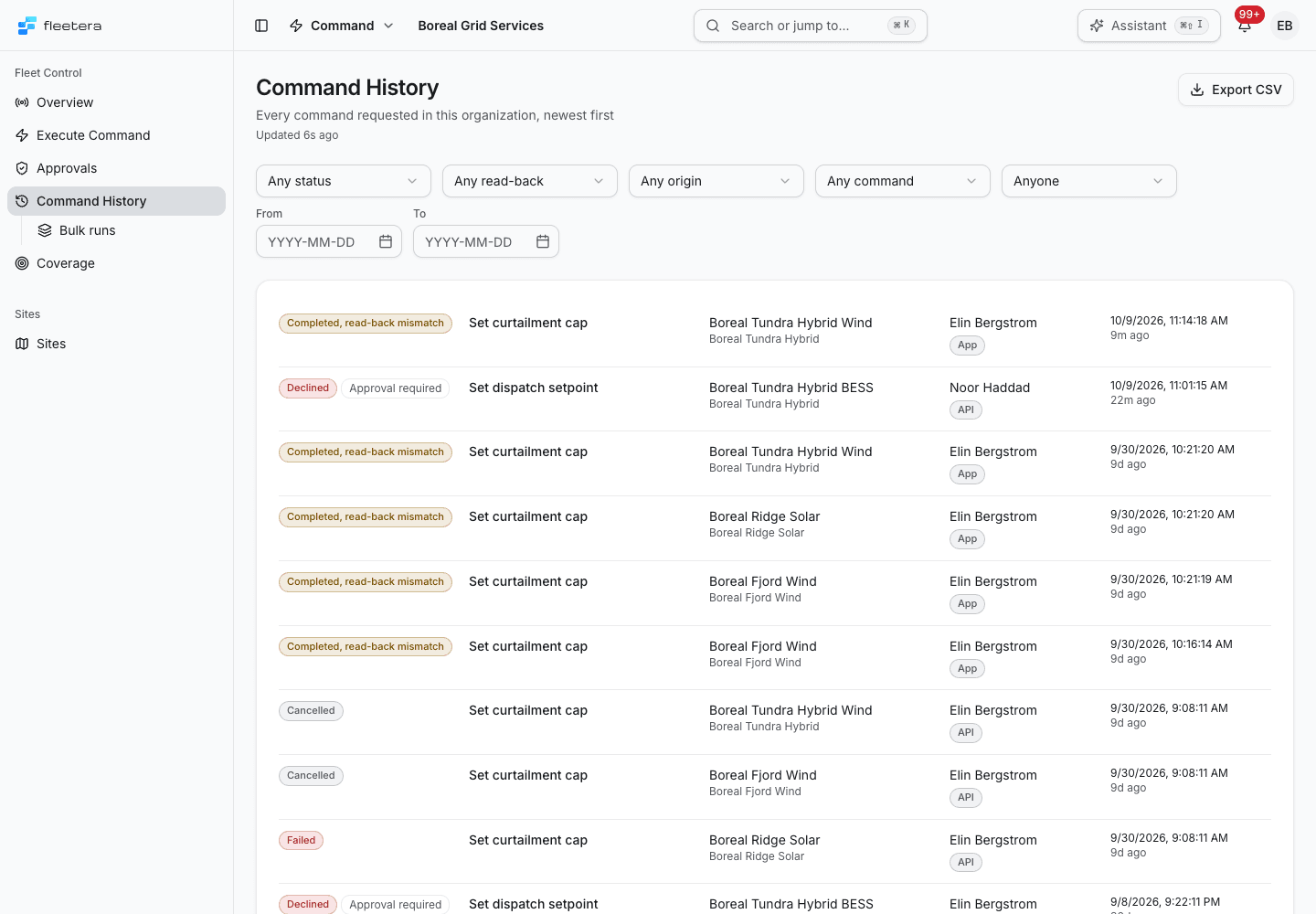
Each row shows:
- the status, and for a critical command whether approval was required at the time: Approval required or Approval not required (tenant setting);
- the command;
- the asset and its site;
- who requested it, and its origin;
- when it was requested, and how long ago.
Select a row to open the command's record.
An asset's own Commands section lists its latest requests. See all commands on this asset opens Command History filtered to that asset; remove the asset filter with the cross beside its name.
Filters
| Filter | Choices |
|---|---|
| Status | Any status, or one of the statuses. Completed matches every completion, whatever its read-back |
| Read-back | Verified, Read-back mismatch, Not verified or No read-back |
| Origin | App, API or Workflow |
| Command | Any command in your catalogue |
| Requester | Anyone, or one person |
| From and To | The days the commands were requested in |
The filters are kept in the page address, so a filtered list can be shared as a link. Clear filters removes them all.
Origin
Origin records where a request came from:
| Origin | Meaning |
|---|---|
| App | Recorded as requested in the Fleetera app |
| API | Recorded as requested directly through the Fleetera API |
| Not recorded | Requested before Fleetera recorded where commands come from |
Origin is what the request declared about itself. It describes how a command was issued and grants nothing. Workflow is reserved for automated workflows, which Fleetera does not offer: no request can be recorded with it today.
The execution record
Each command has its own record page: a timeline on one side and the facts on the other.
The Timeline lists each step with its time and, where a person acted, who it was: requested, approval requested, approved or declined, sent to the gateway, completed, and the read-back. A step that has not happened yet is shown as waiting.
The Facts card holds:
| Fact | What it shows |
|---|---|
| Read-back | Verified, Mismatch or Unverified, with the values or the reason. A mismatch is shown first on the page |
| Outcome | For a record that did not complete: the reason, and whether anything reached the equipment: "Nothing was sent.", "The gateway refused it." or "The outcome is unknown; check the asset before sending again." |
| Command | The command, its risk level, and whether approval was required |
| Parameters as sent | The values sent, with their labels and units. The value the point held before the request is not stored on the record |
| Method return values | For a recorded method response: values in returned order, its message and protocol status. These are separate from read-back |
| Result message | The retained message on an older message-only record |
| Asset, Site, Gateway | Where the command went |
| Requested through | The origin |
| Bulk run | For a command sent in a bulk run, its batch and a link to the run |
| Telemetry | Opens Explorer on the five minutes around the send, so you can check how the equipment responded |
| Record ID | The record's identifier |
For a method response, Method return values lists the returned JSON values in order, including zero, false and null. Strings appear as quoted text. The record supplies no output names, types or units.
- No outputs returned means the method returned an empty list.
- Method return values not reported means the gateway did not include the output field.
- Method return values unavailable means the gateway explicitly reported no available output value.
- Method return values invalid means the gateway's output did not have a valid JSON array shape, or contained text that cannot be stored (such as the null character). The method's success or failure is still recorded.
- Method return values could not be read: invalid result record. means the stored response could not be read safely.
The response message, Protocol status and Reported action appear when recorded. Return values describe the method's response. They do not establish measured equipment state or a verified applied value. Use separate read-back or telemetry evidence to check the equipment. An older message-only record shows Result message; a record with no result cannot supply missing return values.
If an answer arrives after cancellation or expiry, the method response says Gateway answer received after the record closed. The status remains Cancelled or Expired, and the outcome keeps its original certainty.
The record's header offers Open asset, Open run for a command in a bulk run, and Cancel before it is sent on a command that is still pending. A record awaiting approval shows the decision for an approver, see Deciding a request. A command that never reached its gateway links back to the asset's Commands section to send it again.
Bulk runs
Bulk runs, under Command History, lists every bulk run and its rollout. Each row shows the run's status, the command, its current batch and rollout policy, how many assets it targets, its progress, who requested it with its origin, and when. Select a row to open the run page.
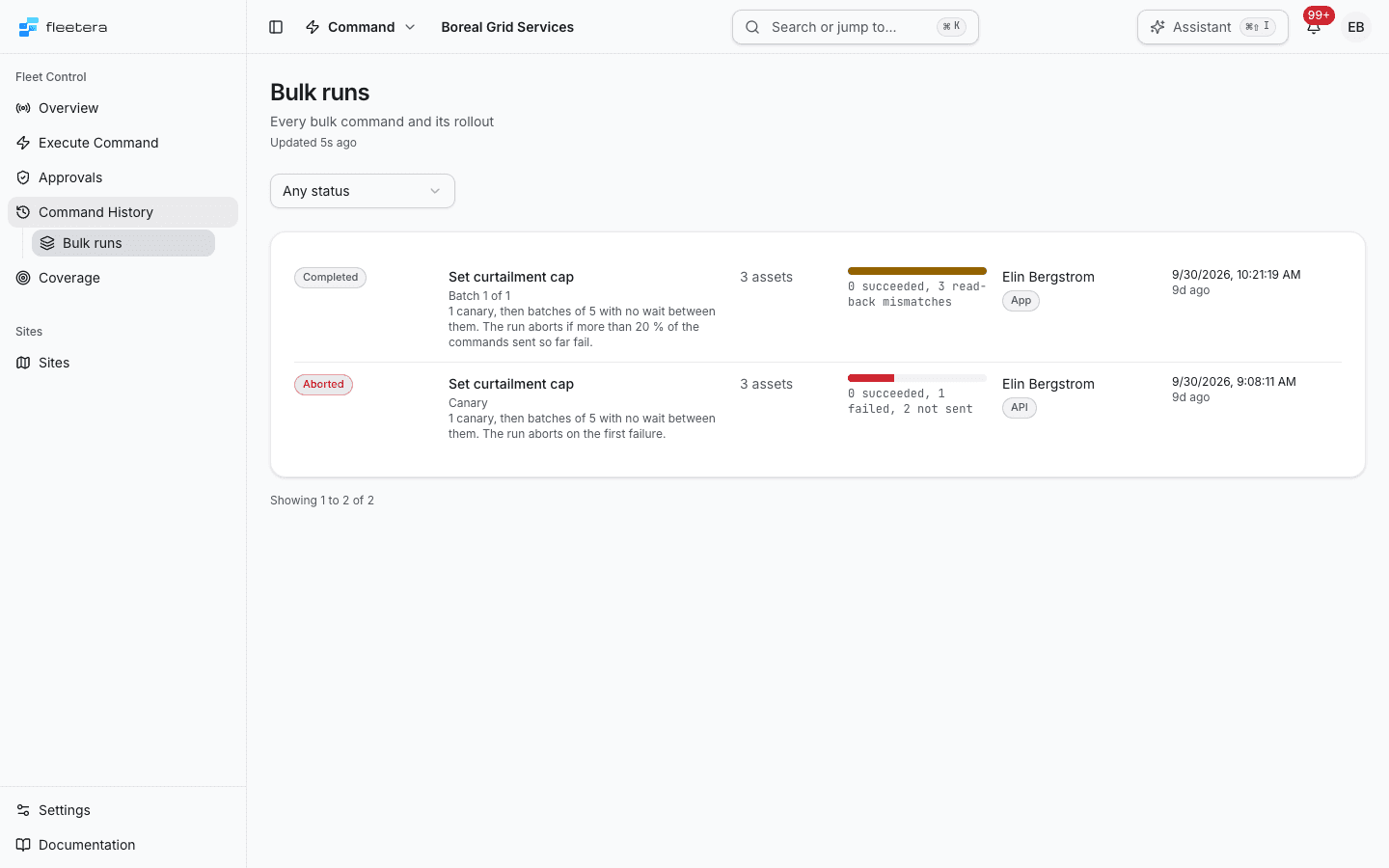
Bulk runs has one filter, the run's status. Runs created before staged rollout say Not staged.
Exporting the ledger
Export CSV on Command History downloads every command that matches the filters on screen, not only the page you see, as command-ledger- followed by the date and .csv. While the file is prepared the button reads Preparing.
The final CSV column, result (JSON), retains the recorded response as JSON, including method return values and any answer received after the record closed. Historical message-only and null results stay as recorded; the export cannot recover missing values.
A file holds at most 50,000 rows. The notice after the download says how many commands the file holds. When more commands match than fit, the notice says the file is capped and how many matched: narrow the filters, for example by date, to export the rest.
Retention
Command History states how long the ledger is kept:
Command records are kept with no expiry date. The analytics copy keeps 365 days.